
What Is Facebook Ad Audience Network? Complete 2026 Guide
 Carlos Garcia5/20/2026
If you've ever set up a Meta ad campaign and seen "Audience Network" listed as a placement option, you've probably wondered what it actually is, where your ads will run, and whether you should leave it turned on. Facebook Audience Network (FAN) is Meta's ad placement that extends your Facebook and Instagram ad campaigns into third-party mobile apps and websites — letting you reach the same audiences outside Meta's owned properties. This guide covers what Audience Network is, how it works, available ad formats, how to set it up, when it makes sense to use, and its real limitations in 2026.
Free SEO + AI Search Audit. Audience Network extends your paid reach beyond Meta. A free SEO + AI search audit shows you exactly where your organic reach stands today — across Google AND in AI search engines like ChatGPT, Claude, Perplexity, and Gemini. Run your free audit → to see where your site ranks in 60 seconds.
What Is Facebook Audience Network?
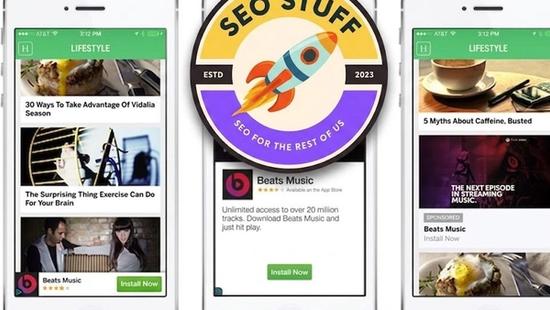
In simple terms, Facebook Audience Network is Meta's ad placement option that displays your Facebook and Instagram ads inside third-party mobile apps and websites. When you create a campaign in Meta Ads Manager and check the Audience Network placement, Meta serves your ad creative on publisher properties that have integrated the Audience Network SDK — extending your campaign reach beyond Facebook and Instagram themselves.
Audience Network is not a separate ad platform. You don't build a new campaign for it. It's simply one of several placements available inside your existing Meta Ads Manager workflow, alongside Facebook Feed, Instagram Feed, Stories, Reels, Marketplace, and Messenger. The same creative, the same targeting, the same audiences — different inventory.
The publishers who join Audience Network get a share of ad revenue, and you (the advertiser) get access to additional inventory that's still targeted using Meta's audience data.
How Facebook Audience Network Works
Audience Network sits between Meta's ad-buying engine and a network of third-party publishers who've integrated Meta's monetization SDK into their apps and sites.
The Publisher Side
App developers and mobile-first publishers integrate the Audience Network SDK into their products. When a user opens the app, the SDK requests an ad from Meta. Meta then runs a real-time auction in which your Meta campaigns can compete — using Meta's first-party data to target the user, even though they're not currently inside Facebook or Instagram.
The Advertiser Side
When you create a Meta campaign and enable the Audience Network placement, your ads become eligible to win those auctions. Meta uses the same targeting parameters you set up (demographics, interests, behaviors, custom audiences, lookalikes) to decide whether to bid on a given impression. If you win, your creative renders inside the publisher's app.
Auction and Pricing
Audience Network impressions are bought through the same auction as Feed and Stories placements. You're not setting a separate bid for Audience Network — it competes against other placements within your campaign budget. Meta optimizes delivery toward the placement that's most likely to drive your stated objective at the lowest cost.
Ad Formats Supported on Audience Network
Audience Network supports a subset of Meta's ad formats, optimized for mobile in-app contexts.
Native Ads
Ads that match the look and feel of the host publisher's app. The publisher controls the styling so the ad fits naturally into their feed or content layout.
Banner Ads
Standard rectangular display banners that appear at the top or bottom of an app screen. Lowest performance but the cheapest inventory.
Interstitial Ads
Full-screen ads that appear between content transitions in an app (for example, between game levels). Higher engagement than banners but more intrusive.
Rewarded Video Ads
Video ads where the user opts in to watch in exchange for an in-app reward (extra lives, in-game currency, premium content unlocks). Common in mobile games. Very high completion rates because the user actively chooses to view.
In-Stream Video Ads
Video ads that play within longer video content on partner properties. Less common than the other formats but available for video-heavy campaigns.
How to Enable Audience Network in a Campaign
Audience Network is a placement inside any compatible Meta ad campaign. Here's how to turn it on.
Step 1: Create or Open a Campaign in Meta Ads Manager
In Ads Manager, click "Create" or open an existing campaign. Audience Network is supported across most objectives — Awareness, Traffic, Engagement, App Promotion, Sales, Lead Generation. Check the Meta Ad Library if you want to see how other advertisers are using it before you launch your own.
Step 2: Go to the Ad Set Level
Placements are configured at the ad set level, not at the campaign or ad level. Click into the ad set you want to configure.
Step 3: Choose "Manual Placements"
Meta defaults new campaigns to "Advantage+ placements," which automatically includes Audience Network. To explicitly control whether Audience Network is on or off, switch to "Manual Placements."
Step 4: Check or Uncheck Audience Network
Under Manual Placements, you'll see a checklist of every available placement. Audience Network appears as one of the options, with sub-options for Native, Banner, Interstitial, Rewarded Video, and In-Stream Video. Check the box to include — uncheck to exclude.
Step 5: Use Block Lists if Needed
If you want Audience Network on but with brand safety controls, set up a publisher block list in Meta Business Manager → Brand Safety → Block Lists. You can also exclude entire content categories (gambling, dating, mature content, etc.) at the account level.
Step 6: Set Up Tracking
Make sure your campaign's tracking is set up to attribute Audience Network impressions and clicks properly — including any conversion API events you depend on for performance measurement.
Free SEO + AI Search Audit. Paid placements like Audience Network expand your reach in the short term. Organic visibility compounds over years. Get a free audit of how your site performs across Google AND every major AI search platform.
When to Use Facebook Audience Network
Audience Network isn't right for every campaign. Here's when it tends to deliver.
1. App Install Campaigns
Audience Network excels at app installs. Its inventory is mobile-app-native, and the rewarded video format in particular drives strong app install rates at lower CPI than feed placements. If you're running mobile app campaigns, leaving Audience Network on is almost always a good idea.
2. Broad Awareness Campaigns
If your objective is reach or brand awareness and you're not picky about which exact properties show your ad, Audience Network gives you cheap incremental impressions to your target audience.
3. Retargeting at Scale
Audience Network is useful for retargeting custom audiences (cart abandoners, past visitors, app users) outside Meta. The same person you targeted on Facebook can be reached inside a weather app or game an hour later — increasing total ad exposure without bumping your bid on Feed.
4. Performance Campaigns with Tight CPA Targets
Counterintuitively, Audience Network can deliver strong cost-per-action (CPA) on Sales or Lead campaigns when Meta's algorithm finds inventory at low cost. Test it. If Meta's optimization is hitting your CPA target with Audience Network on, leave it on. If not, exclude it.
5. Video Campaigns Where Completion Matters
Rewarded video has industry-leading completion rates. If you have a video story to tell and care that people watch most of it, rewarded inventory is a unique unlock.
Limitations of Facebook Audience Network
Audience Network has real downsides advertisers should plan for.
Brand safety risk. You don't fully control which apps and sites display your ads. While Meta provides category-level exclusions and publisher block lists, ads can still appear in lower-quality contexts. For luxury brands, regulated industries, or anyone running awareness campaigns where context matters, this is a legitimate concern.
Lower-quality clicks. Click-through rates on Audience Network can be inflated by fat-finger taps inside apps, especially on banner and interstitial placements. Downstream conversion rates often lag Feed placements significantly.
Limited transparency. Unlike Google's Display Network, Meta provides limited per-placement reporting. You see aggregate Audience Network performance, not a breakdown by individual app or site.
Format restrictions. Some Meta ad formats (Carousel, Collection, Slideshow) have limited or no Audience Network support. Your creative may need to be adapted or you'll exclude this placement automatically.
Mobile only. Audience Network is overwhelmingly mobile-app inventory. If your audience is primarily desktop, you're spending budget where they aren't.
Iframe/SDK limitations. Some advanced ad features (interactive previews, complex landing experiences) don't render the same way on Audience Network as they do in Feed.
Attribution challenges. Because Audience Network impressions happen in third-party apps and sites, last-touch attribution can be tricky. Tools like Meta's Conversions API help, but expect more attribution friction than with Facebook Feed.
Facebook Audience Network vs Other Display Options
A quick comparison.
Facebook Audience Network
- Inventory: mobile apps and mobile web of third-party publishers
- Targeting: Meta's first-party audience data
- Best for: app installs, broad reach, retargeting at low cost
Google Display Network (GDN)
- Inventory: 2M+ websites and apps via AdSense and Google Ad Manager
- Targeting: Google's audience signals (search history, YouTube behavior, demographics)
- Best for: large-scale display campaigns inside the Google ecosystem
Programmatic DSPs (The Trade Desk, DV360)
- Inventory: open programmatic exchanges across the web
- Targeting: any data you upload or buy (CRM, third-party data, contextual)
- Best for: enterprise advertisers with sophisticated targeting needs
Free SEO + AI Search Audit. Audience Network gives you incremental paid reach. Organic search visibility — including in AI engines like ChatGPT and Perplexity — is where most buyers are starting their research in 2026. Run a free audit to see exactly where your site stands.
Should You Leave Audience Network On by Default?
The honest answer: it depends on your objective and your patience for testing.
For app installs and broad awareness, the default answer is yes — Audience Network adds cheap reach and the algorithm tends to find efficient inventory. For Sales and Lead campaigns, test it with placement-level reporting on. If CPA holds, leave it on. If CPA degrades meaningfully, exclude it.
For high-touch brands where context matters (luxury, regulated industries, B2B with named-account focus), the default answer is usually no. Stick to Feed, Stories, and Reels where you have more control over the context your ad appears in.
Final Thoughts
Facebook Audience Network is a useful extension of your Meta ad reach — particularly for app installs, awareness, and retargeting at scale. It's not a separate platform you have to manage; it's a checkbox inside your existing Meta Ads Manager workflow. Test it, watch the metrics, and use placement-level reporting to decide whether it's earning its place in any given campaign.
Beyond paid placements, the bigger 2026 question for most marketing teams is where their organic traffic is going. Increasingly, buyers are bypassing search and asking AI search engines like ChatGPT, Claude, Perplexity, and Gemini for product recommendations. If you're spending on Audience Network but have no visibility into how you're showing up in AI search, you're optimizing the smaller half of the funnel. Run a free audit to see exactly where your site performs across Google AND every major AI search platform — and which fixes will move the needle this quarter.


