
What Is Meta Ad Library? A Complete Guide for 2026
 Carlos Garcia5/13/2026
If you've ever wondered what ads your competitors are running on Facebook or Instagram, or how a brand you admire approaches its creative, Meta Ad Library is your answer. Launched as part of Meta's push toward advertising transparency, the Ad Library lets anyone browse every ad currently active across Meta's platforms — for free, with no Facebook account required. This article will show you what Meta Ad Library is, why Meta built it, what you can find inside, and the most practical ways to use it for competitive research and creative inspiration in 2026.
Free SEO + AI Search Audit. Running ads is only one growth lever. The biggest one most brands are leaving on the table is being visible in search — both Google and AI platforms like ChatGPT, Claude, Perplexity, and Gemini. See exactly how your website performs across all of them in 60 seconds. Run your free audit →
What Is Meta Ad Library?
In simple terms, Meta Ad Library is a free, public, searchable database of every ad currently running across Meta's family of apps — Facebook, Instagram, Messenger, and the Meta Audience Network. Anyone can use it. You don't need a Facebook account, you don't need to log in, and you don't need to be an advertiser yourself. You just visit facebook.com/ads/library and start searching.
Think of it as the public-facing window into Meta's entire active ad inventory. If a brand is paying to put an ad in front of users on any Meta surface right now, that ad has to appear in the Ad Library. There are no opt-outs and no exceptions for "boring" ads — every active ad is there, from a small local bakery's $5/day boost to Coca-Cola's multi-million-dollar global campaigns.
For political and social-issue ads, the Ad Library goes a step further: it keeps those ads visible for seven years after they stop running, along with information about who paid for them, roughly how much was spent, and a high-level demographic breakdown of who saw them. Commercial ads, by contrast, only appear while they're active.
Why Did Meta Build the Ad Library?
To really understand the value of Meta Ad Library, you have to understand the two problems it was designed to solve. Both pushed Meta toward transparency it never would have chosen voluntarily.
Political Ad Transparency After 2016
After the 2016 U.S. election, Meta (then Facebook) faced massive public and regulatory scrutiny over political ads — specifically, foreign-funded ones, ads with misleading claims, and ads that "micro-targeted" tiny audience slices in ways that made them effectively invisible to journalists and researchers. The criticism was simple: nobody outside Facebook could see who was buying influence on the platform, what they were saying, or who they were saying it to.
The Ad Library was Meta's answer. By making every active ad publicly viewable — and keeping political ones archived for years with funding disclosures — Meta could point to a structured, queryable, no-account-required database whenever regulators or journalists asked. It was a defensive product, but it created an unexpected upside: marketers, analysts, and competitors suddenly had unprecedented visibility into how every brand on Earth was running its ads.
Building Trust with Advertisers and Users
The second motivation was longer-term. As privacy regulations like GDPR, CCPA, and Apple's App Tracking Transparency tightened, Meta needed to prove it wasn't running a black-box ad system. The Ad Library — alongside features like "Why am I seeing this ad?" and ad preference controls — became a public signal that Meta was willing to expose what was happening on the platform, even when it was unflattering.
The catch: The Ad Library doesn't show everything. It shows the creative, the brand, and (for political ads) some context — but it intentionally hides the granular targeting parameters used for commercial ads. You can see that a brand is running a campaign; you can't see exactly who they're targeting. We'll cover this limitation in detail below.
What You Can Find in Meta Ad Library
Once you're inside, the Ad Library is more useful than most people realize. Here's what's actually available, broken down by category.
Active Ads (and How Long They've Been Running)
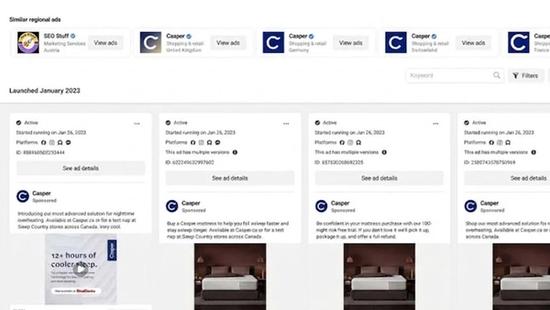
Every active ad shows up with three things you can immediately use:
- The creative itself — the image, video, headline, description, and call-to-action button exactly as users see it
- The Page running it — so you can see all ads from a single brand at once
- The platforms it's running on — Facebook feed, Instagram feed, Reels, Stories, Messenger, etc.
- The launch date — how long the ad has been live (a strong proxy for whether it's working)
That last one is the secret weapon for competitive research. If a competitor has been running the same ad for six months, it's almost certainly profitable for them. If they launched five new variants of an ad last week, you're watching live A/B testing.
Free SEO + AI Search Audit. Studying your competitors' ads is a great start. But if their organic traffic is also crushing yours in Google and AI search, you're losing the war on two fronts. Run a free audit to see exactly how your site performs in Google and in ChatGPT, Claude, Perplexity, and Gemini — and where the biggest gaps are.
Political and Social-Issue Ads
This is where the Ad Library really shines for accountability use cases. Political ads — defined broadly to include anything about elections, candidates, social issues like immigration or climate, or civic engagement — get a much richer disclosure package:
- Funding entity — who actually paid for the ad (often a PAC or committee, not the candidate directly)
- Total spend range — bracketed dollar amounts (e.g., "$5,000–$10,000")
- Total impressions range — how many times the ad was shown
- Audience demographics — age, gender, and region breakdown of who saw it
- Seven-year archive — even after the ad stops running, the record stays
Journalists, academics, and political analysts use this data constantly. If you've ever read an article about who's spending what on a political race, there's a near-100% chance the underlying data came from the Ad Library.
Brand and Page Information
Every ad links back to the Facebook Page running it. From there, you can see:
- Page transparency information — when the Page was created, name change history, country of administrators
- Other active ads from the same Page
- Page category and basic profile info
For commercial competitive research, the "other active ads from the same Page" link is gold. One click and you're looking at a brand's entire current ad portfolio.
How to Use Meta Ad Library (Step-by-Step)
Searching the Ad Library is simple once you know the patterns. Here's the basic flow:
- Go to facebook.com/ads/library in any browser. No login required.
- Select your country at the top — Ad Library is country-scoped, so you'll only see ads served to users in that country.
- Choose your ad category: All Ads, Issues/Elections/Politics, or Housing/Employment/Credit (specialized categories with extra disclosure requirements in the U.S.).
- Search by brand name, keyword, or website. For brand-specific research, search the company name and click into the Page result.
- Filter by platform (Facebook, Instagram, Messenger), media type (image, video, no image), language, and active status.
- Click any ad to see full details — the creative, launch date, ad platforms, and (for political ads) the funding and demographic breakdown.
For deeper competitive research, the Ad Library API lets you pull this data programmatically. You'll need a Facebook developer account and approval, but once you have access you can query ads by brand at scale.
When Should You Use Meta Ad Library?
Now that you know what's in there, here are the most practical scenarios where the Ad Library pays off:
1. Spying on Competitor Ad Strategy
This is the #1 use case. Drop a competitor's brand into the search bar and instantly see every ad they're running, on which platforms, with what creative, and (using launch dates) which ads have been live long enough to suggest they're working. If you're an e-commerce brand and your top competitor is running 40 ads with the same hook and only 2 with a different hook, you've just learned what's converting for them.
2. Stealing Creative Inspiration (Ethically)
If you're writing ad copy, designing creative, or planning a campaign, the Ad Library is the world's largest free swipe file. Search for any product category — "running shoes," "B2B SaaS," "online courses" — and study how the best-performing brands frame their value props, structure their headlines, and design their visuals. You can't copy their creative directly, but you absolutely can study their patterns.
3. Vetting Agencies, Freelancers, and Influencers
Before you hire a marketing agency or freelancer, look up their clients in the Ad Library. Are their clients actually running paid campaigns? Are the campaigns running long enough to suggest they're profitable? Are the agencies running ads themselves (a basic sanity check)? Five minutes in the Ad Library can save you a six-figure mistake.
Free SEO + AI Search Audit. Most ad strategies stop at paid. But the brands compounding fastest in 2026 are the ones showing up in Google and in ChatGPT, Perplexity, Gemini, and Claude when people search. Get a free audit of exactly where your site stands across all of them — and the highest-impact fixes to make this quarter.
4. Researching Political Spend (For Journalists, Researchers, Advocates)
If you're tracking a political race, a ballot initiative, or a public-policy campaign, the Ad Library is the closest thing to a public ledger. Funding entities, spend brackets, impression counts, and demographic breakdowns are all there. Combine with the official FEC filings (in the U.S.) for a complete picture of digital political spending.
5. Internal Brand Safety and Compliance
If you work in legal, compliance, or brand protection, the Ad Library is also useful in reverse: search your own brand name to see if anyone is running unauthorized ads using your name, logo, or product claims. Counterfeiters and unauthorized resellers often surface here, and you can use the findings to file takedown requests directly through the ad's reporting flow.
Limitations of Meta Ad Library
The Ad Library is genuinely useful, but it's not magic — and pretending it is leads to bad decisions. Here are the limitations worth knowing.
It doesn't show targeting parameters (for commercial ads). You can see that an ad is running and roughly when it launched, but for commercial ads you can't see the audience definition — age range, location, interests, lookalike sources, custom audiences, etc. This is the single most-asked-about missing feature, and it's missing on purpose.
It only shows currently active ads (for commercial categories). Once a brand pauses or ends an ad, it disappears from the Ad Library. There's no historical archive of commercial creative — only what's running right now. (Political ads, again, are the exception with their seven-year archive.)
Spend and impression data is bracketed and only available for political ads. For commercial ads, you can't see how much a brand is spending or how many people have seen the ad. Even for political ads, the data comes in wide bracketed ranges, not exact figures.
It's country-scoped. An ad running in the U.S. won't show up if you've selected the U.K., and vice versa. For multi-country research you have to check each country individually.
Search can be imprecise. Brand-name searches sometimes return ads for similarly-named entities, and keyword searches inside ad text can miss ads where the keyword appears in the image rather than the copy. For serious research, plan to spend extra time filtering and verifying.
Final Thoughts
Meta Ad Library is one of the most underrated free tools in marketing. For competitive research, creative inspiration, agency vetting, and political accountability, nothing else on the internet matches its combination of breadth, depth, and zero cost. The catch is knowing what it can and can't tell you — and not over-interpreting the absence of targeting or spend data for commercial ads.
If you take only one habit from this article, make it this: every Monday morning, spend 10 minutes in the Ad Library on your top three competitors. Note which ads have been live the longest, which have been refreshed, and which creative angles are showing up across the board. Over a few months, you'll build a sharper read on your category than most paid-research tools can give you.
And if you're investing in ads, don't forget the other side of the equation: organic search. The brands compounding fastest in 2026 aren't just running great ads — they're getting cited by ChatGPT, Claude, Perplexity, and Google's AI Overviews when potential customers ask AI for product recommendations. If you don't know how your site performs in those answers, run a free audit and see exactly where you stand in Google and every major AI search platform.


