
Why Does Google Analytics Show "Not Provided" for Keywords? (2026 Guide)
 Carlos Garcia5/16/2026
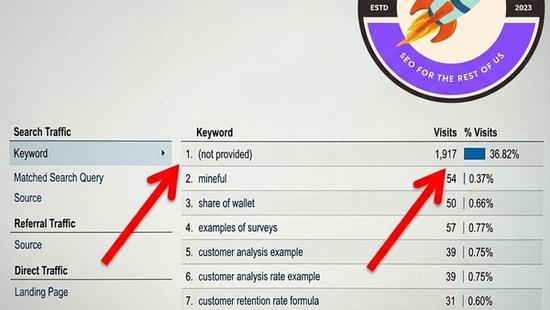
If you've ever opened the keyword report in Google Analytics hoping to see what search terms brought visitors to your site — and instead seen a giant "(not provided)" row swallowing 90%+ of your traffic — you've experienced one of the longest-running mysteries in SEO. The short answer: it's intentional, it's been the case since 2011, and it's part of Google's broader privacy posture. The long answer is what this article is for. We'll cover exactly why "not provided" exists, what data Google does still share, how to recover some of the missing visibility, and why the entire question matters less in 2026 than it used to.
Free SEO + AI Search Audit. Google Analytics keyword data has been hidden behind "(not provided)" for over a decade. The bigger question now is whether your site is visible in AI search at all — in ChatGPT, Claude, Perplexity, and Gemini. Run your free audit → to see exactly where your site stands across every major search and AI platform.
What Does "(not provided)" Mean in Google Analytics?
In simple terms, "(not provided)" is Google's way of saying: "A user reached your site from a Google search, but we're not telling you what they searched for." When Google made the switch to HTTPS-by-default for all search results in 2011-2013, the search query stopped being passed in the HTTP referrer header. Without that header, analytics tools have no way to know which keyword brought each visitor.
The result: in Google Analytics, the "Organic Keywords" report became almost useless. Where it once showed thousands of distinct search terms driving traffic to your site, it now shows the top few that are still trackable for technical reasons — and one giant "(not provided)" bucket that absorbs the vast majority of organic visits.
Most analysts checking this report for the first time assume it's a bug or a configuration error. It's neither. It's working as Google designed.
Why Did Google Hide Keyword Data?
Google's stated reason is user privacy. When you search for something — especially something sensitive (medical conditions, financial troubles, personal questions) — Google's argument is that the websites you click on shouldn't be able to identify what you were looking for. By stripping the search query out of the referrer header, Google prevents your queries from being shared with every site you visit.
That's the public framing. The more cynical analyst-side framing is that Google created the "not provided" wall and simultaneously made the actual keyword data available — but only to advertisers paying for Google Ads, through the Search Terms report in Google Ads, and to anyone (free) through Google Search Console. The effect was to push more SEO professionals toward Google's owned tools (especially Search Console) and to make the relationship with Google's free tools (Analytics) more dependent on Google's other products.
Whatever the motivation, the result is the same: as of 2026, the "Organic Keywords" report in Google Analytics is essentially decorative. The real keyword data lives elsewhere.
What Data IS Still Available?
The good news: you can recover most of the missing keyword data through different sources.
Google Search Console (Free)
Search Console is Google's free tool for site owners, and it shows you exactly what queries brought visitors to your site — including the position your page ranked at, how often it was shown, and how often people clicked. This is the primary replacement for the lost Analytics keyword data.
Limitations: Search Console only shows queries that triggered impressions in the last 16 months, with some sampling and privacy filtering on low-volume queries. But for the vast majority of useful insights, Search Console is now the source of truth for organic search performance.
Google Ads (Paid)
If you run paid search campaigns, the Search Terms report in Google Ads shows exactly what queries triggered your ads. This is the only place where paid search query data is fully exposed.
Third-Party Rank Trackers
Tools like Ahrefs, SEMrush, Moz, and Serpstat infer keyword rankings by crawling Google's search results from the outside. They show you which keywords your site ranks for, at what positions, and how those positions have changed over time. They don't show you the queries of actual visitors — they show you the keyword universe your site competes in.
Linking Search Console to Google Analytics
You can link your Search Console property to your GA4 property and pull Search Console data into Analytics reports. This combines the keyword data Search Console knows with the behavioral data Analytics knows (bounce rate, session duration, conversions per keyword). It's an imperfect bridge — but it's the closest thing to the pre-2011 unified view.
Free SEO + AI Search Audit. Google Analytics keyword data is a known dead-end. But the bigger blind spot for most teams in 2026 is AI search — how your site performs in ChatGPT, Claude, Perplexity, and Gemini, where queries aren't shared at all yet. Run a free audit to see exactly where you stand across every major AI search platform.
How to Investigate "Not Provided" Traffic Anyway
Even with the keyword data hidden, you can extract a lot of insight from the "(not provided)" bucket using indirect methods.
1. Look at Landing Page Reports
In GA4, the Landing Page report shows which pages on your site received organic traffic. Cross-reference those pages with the keywords Search Console shows each page ranking for. You can infer which keywords likely drove traffic to specific landing pages.
2. Cross-Reference with Search Console Query Reports
For each of your top landing pages, pull the Performance report in Search Console filtered to that page's URL. Search Console shows the queries that drove impressions and clicks to that specific page. This is the closest you can get to "what keyword brought this visitor."
3. Use Time-Based Pattern Matching
If you publish content on a specific topic on Monday and see a spike in "(not provided)" organic traffic on Tuesday, you can reasonably attribute that spike to queries related to your new content. Combine with Search Console data for confirmation.
4. Segment by Behavior
Visitors from different keyword categories often behave differently. Segment your "(not provided)" traffic by landing page, session duration, pages per session, and conversion rate. Patterns emerge that reveal what kind of intent the underlying queries represent.
When Should You Care About "Not Provided" Data?
For most modern SEO workflows in 2026, the answer is "less than you think."
1. Diagnosing Content-Keyword Mismatch
If a specific page gets lots of traffic but poor engagement, knowing the queries driving that traffic helps you diagnose whether the page is matching the wrong search intent. Search Console + landing page reports in GA4 cover this.
2. Identifying New Keyword Opportunities
For finding queries you're already getting impressions for (but not many clicks), Search Console's Query report is the primary source. The "(not provided)" gap in Analytics doesn't matter — you'd use Search Console anyway.
3. Tracking Brand-Specific vs Non-Brand Search
For separating brand vs non-brand traffic, you can filter Search Console by queries containing your brand name. You don't need to recover the data hidden behind "(not provided)" — Search Console exposes it directly.
Free SEO + AI Search Audit. "(Not provided)" was the SEO data blind spot of the 2010s. AI search visibility is the blind spot of the 2020s — and it's getting larger every quarter. Get a free audit of how your site performs in Google AND in ChatGPT, Claude, Perplexity, and Gemini — and the highest-impact fixes for this quarter.
4. Reporting on SEO Performance
For client or executive reporting, "(not provided)" creates communication friction ("why can't you tell me what keywords are working?"). Frame the report around Search Console data: "Here are the queries that drove our organic visibility this month." Skip the Analytics keyword report entirely.
Limitations and Workarounds
Search Console has its own limitations. Sampling on low-volume queries, 16-month data retention, queries below a privacy threshold are hidden. It's not a complete replacement for the lost Analytics data.
Third-party tools are estimates, not actuals. Ahrefs and SEMrush show what keywords you theoretically rank for, not what users actually searched. They're invaluable for keyword research but aren't a substitute for actual query data.
Paid plug-ins and workarounds don't really work. Various tools promise to "recover not provided keywords." They mostly don't. The data simply isn't being sent — no tool can synthesize it from nothing.
Privacy is only going one direction. Apple's Safari blocks more referrer data each year. Chrome is moving toward fewer cross-site signals. AI search engines like ChatGPT and Perplexity don't share any query data at all yet. The amount of search query data available to site owners is shrinking, not growing.
Mobile and incognito traffic compounds the problem. Already-private query data is even more hidden on mobile (where most searches happen) and in incognito browsing.
Different countries have different data exposure. EU GDPR and California CCPA add additional layers of data masking. The picture in your Analytics may differ depending on where your traffic is coming from.
Final Thoughts
The "(not provided)" mystery isn't going to be solved. It's been over a decade since Google made the change, and the trend is toward less keyword data, not more. The pragmatic response is to shift your SEO workflows toward Search Console for query data, GA4 for behavioral data, and third-party tools (Ahrefs, SEMrush, Moz) for competitive keyword research. The "Organic Keywords" report in Analytics is a relic — stop checking it and you'll spend less time frustrated.
The deeper truth for 2026: Google keyword visibility, even with workarounds, is becoming less relevant as search itself fragments. More buyers now ask ChatGPT, Claude, Perplexity, and Gemini for product and service recommendations than ever before — and none of those platforms share query data at all. The new SEO question isn't "what keyword brought this visitor?" — it's "does my brand even appear when buyers ask AI for recommendations?" Run a free audit to see exactly where your site stands across Google AND every major AI search platform.


