What Mediums Are Available in Google Analytics? (2026 Guide)
 Carlos Garcia5/25/2026
If you've been working through Google Analytics 4 acquisition reports and seen the "Medium" dimension — and wondered which mediums GA4 actually recognizes, how they map to channels, and what to put in your UTM tags — you're not alone. Mediums available in Google Analytics 4 aren't a fixed list either — GA4 accepts any string you pass via utm_medium, but its Default Channel Grouping recognizes a specific set of "well-known" medium values (organic, cpc, ppc, paidsearch, referral, email, social, social-network, social-media, sms, push, banner, display, cpm, retargeting, affiliate, video, audio, app, and others) that get routed to named channels like Organic Search, Paid Search, Email, and Organic Social automatically. This guide explains exactly what a Medium is in GA4, the medium values GA4 maps to its default channels, common UTM conventions, how to avoid the "(other)" channel trap, and what to do when your medium doesn't match a default in 2026.
Free SEO + AI Search Audit. Mediums tell you the type of traffic — but only after a visitor lands. A free SEO + AI search audit shows where your visibility comes from across Google AND inside AI search engines like ChatGPT, Claude, Perplexity, and Gemini. Run your free audit → to see how your site is being discovered today.
What Is a Medium in Google Analytics? The Direct Answer
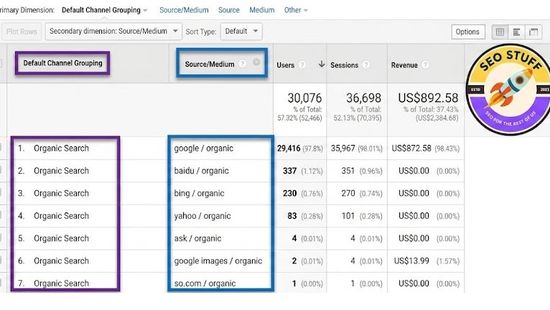
In simple terms, a Medium in GA4 is the type or category of traffic a session arrived from. It's the second half of the classic source / medium pair — where Source is where the traffic came from (google, facebook, newsletter_may) and Medium is what kind of traffic it is (organic, cpc, email, social, referral).
Examples:
google / organic— free clicks from a search enginegoogle / cpc— paid clicks from a Google Ads search campaignfacebook / social— clicks from a Facebook social sharenewsletter_may / email— clicks from a tagged email(direct) / (none)— sessions with no detectable source or medium
GA4 doesn't ship with a hard "allowed mediums" list. Any string passed via utm_medium becomes a Medium. But GA4 does maintain an internal list of well-known medium values that trigger automatic channel grouping rules — and using anything outside that list routes traffic into "(other)" by default.
The Default Mediums GA4 Recognizes Out of the Box
These are the medium values GA4 maps to named channels in its Default Channel Group.
Organic Search Mediums
The single medium value: organic.
Used when a session arrives from a known search engine (google, bing, duckduckgo, etc.) with no UTM tags. GA4 fills in organic automatically.
Paid Search Mediums
Multiple values, matching the regex ^(.*cp.*|ppc|retargeting|paid.*)$. Most commonly:
- cpc — cost per click
- ppc — pay per click
- paidsearch — explicit paid search tag
- paid — generic paid tag
- sem — search engine marketing
Email Mediums
Single value: email.
The trigger for the Email channel. Pair with any source value (mailchimp, newsletter_brand, klaviyo, etc.).
Social Mediums
Multiple values, matching the regex ^(.*social.*|.*-social.*|social-.*)$. Most commonly:
- social — generic social
- social-network — explicit
- social-media — explicit
- socialmedia — variant
- sm — abbreviated (often risky — see notes below)
Display Mediums
Values:
- display
- banner
- cpm (cost per mille — paid display)
- interstitial
- expandable
Affiliate Mediums
Single value: affiliate.
Triggers the Affiliate channel.
Referral Mediums
Single value: referral.
GA4 fills this in automatically when a session arrives from a third-party domain not in the search/social/video/shopping lists, and with no other UTM tags.
Video Mediums
Values:
- video — embedded video ad clicks
- organic-video — organic referrals from YouTube, Vimeo, etc.
Audio Mediums
Single value: audio.
Often used for podcast monetization or audio ad attribution.
Push Mediums
Single value: push.
For push notification campaign attribution.
SMS Mediums
Single value: sms.
For SMS campaign attribution.
App Mediums
Single value: app.
For mobile app install / in-app referral campaigns.
Direct Medium
Value: (none).
GA4 fills this in for sessions with no detectable source or medium.
Free SEO + AI Search Audit. Most marketing teams overlook AI search — but it's increasingly where discovery starts. A free SEO + AI audit shows exactly where your brand shows up across both Google AND every major AI search platform. Get a free audit.
How Mediums Drive Default Channel Grouping
GA4's Default Channel Group is a series of rules that translate source / medium combinations into named channels. Most of these rules are medium-driven.
Example Channel Rules (Simplified)
- Paid Search: medium matches
^(.*cp.*|ppc|paid.*)$AND source matches a known search engine - Organic Search: medium =
organic(filled automatically when source is a known search engine) - Paid Social: medium matches
^(.*cp.*|ppc|paid.*)$AND source matches a known social platform - Organic Social: medium matches
^(.*social.*)$AND source matches a known social platform - Email: medium =
email - Affiliates: medium =
affiliate - Display: medium =
display,banner,cpm, etc. - Referral: medium =
referral(filled automatically for unknown sources with no UTMs) - Direct: medium =
(none)AND source =(direct)
When neither source nor medium matches any default rule, the session lands in Unassigned (or "(other)" in older nomenclature).
How Mediums Differ From Related Dimensions
A quick disambiguation.
Medium vs Source
- Medium: the type of traffic (organic, cpc, email, social, referral)
- Source: where the traffic came from (google, facebook, newsletter_may, etc.)
- Always paired in reports as
source / medium
Medium vs Channel Group
- Medium: granular — one specific medium value per session
- Channel Group: the bucket the medium (combined with source) maps into in reports (Organic Search, Paid Search, Email, Social, etc.)
Medium vs Campaign
- Medium: the type of marketing channel
- Campaign: the specific marketing campaign within that medium (
utm_campaign=spring_sale)
Medium vs Default Channel Group
The Default Channel Group is GA4's mapping rule that translates source + medium combinations into named channels. The Medium itself is just the raw value you pass.
How to Set the Medium for Each Channel
Practical conventions.
Email Campaigns
utm_medium=email. Don't use variations like e-mail, mail, newsletter, or enews — they won't route to the Email channel automatically.
Paid Search Ads
utm_medium=cpc (most common) or utm_medium=paidsearch. Google Ads auto-tagging handles this automatically when enabled — no manual UTM needed.
Paid Social Ads
utm_medium=cpc or utm_medium=paid-social. Avoid utm_medium=paid alone — it's ambiguous between Paid Search and Paid Social and may route inconsistently.
Organic Social Sharing
utm_medium=social. For platform-specific differentiation use the source: utm_source=instagram&utm_medium=social.
Referral Programs
utm_medium=referral is automatic for unknown domains — but if you're running an explicit referral program (refer-a-friend), use utm_medium=referral-program or just affiliate so it doesn't blend with organic referrals.
Affiliate Campaigns
utm_medium=affiliate. Source is the affiliate name or ID.
Display Ads
utm_medium=display or cpm. Banner-specific networks may use banner.
Push Notifications
utm_medium=push. For app vs web push, use the source to differentiate.
SMS Campaigns
utm_medium=sms.
QR Codes
utm_medium=offline or utm_medium=qr. Neither is a default — you'll likely need a custom channel grouping rule.
Podcasts
utm_medium=podcast or utm_medium=audio. audio triggers the audio rule; podcast doesn't by default.
How to Read Medium Reports in GA4
Practical patterns.
1. Always Look at Source/Medium Together
Just "cpc" doesn't tell you anything — google / cpc vs facebook / cpc are different paid channels with different optimization levers.
2. Compare Conversion Rates by Medium
Sort by conversion rate, not session count. Email usually converts highest. Organic Search converts well for branded keywords. Paid Search converts on intent. Social usually converts lowest.
3. Watch for "(not set)" Mediums
If sessions have a source but no medium, that's a UTM tagging gap. Check campaign builders, redirect chains, or referral domains that strip parameters.
4. Check the (Other) Channel Volume
If "(Other)" / "Unassigned" has a meaningful share of sessions, your team is using non-standard medium values. Audit which ones and either update the tags or extend your channel grouping rules.
5. Look for Same Medium Across Multiple Sources
Email, Social, and Paid Search all have "many sources, one medium" patterns. Use this to compare campaigns within a medium type.
6. Track AI Search Mediums Separately
In 2026, sessions from AI search engines (ChatGPT, Claude, Perplexity, Gemini) typically arrive with utm_medium=referral since those sources aren't in GA4's search engine list yet. Either retag links you control with utm_medium=ai_search (custom) or build a custom channel grouping rule.
Free SEO + AI Search Audit. Most teams obsess over Medium tagging hygiene but never check whether AI search is referring traffic at all. A free audit catches what's currently invisible. Run yours →
Common Medium Mistakes That Break Channel Grouping
The patterns we see most often.
1. Capital Letters in Medium Values
Email and email are different values to GA4. Email won't match the email channel rule. Always lowercase.
2. Underscores vs Hyphens
paid-social matches the regex; paid_social does not (depending on grouping rules). Pick one convention and stick to it.
3. Custom Medium Values
utm_medium=newsletter won't route to Email. Use email instead, and put newsletter in the source (utm_source=newsletter_may&utm_medium=email).
4. Branded Medium Values
utm_medium=hubspot or utm_medium=mailchimp are common mistakes — these belong in the source field, not medium.
5. Spaces in Medium Values
Avoid spaces entirely. Use hyphens or underscores. Spaces get URL-encoded to %20 and break GA4's regex matching.
6. Old Medium Conventions Carried Over From UA
Universal Analytics handled some medium values that GA4 routes differently. (not set) defaults, "ppc" mapping, and "social" subcategories all behave differently in GA4. Audit and migrate.
Limitations of GA4 Medium Data
A few honest caveats.
The "available" list isn't published. Google maintains the regex rules internally and updates them without notice. Treat this list as accurate as of 2026 but expect minor changes.
AI search mediums aren't classified yet. AI search referrals show as referral (the medium), not organic or ai_search, until Google updates the default channel grouping.
Custom channel groups behave separately. If you've defined custom channel groupings, your medium values may route differently than this guide describes.
Medium attribution depends on consent. Users who decline analytics consent contribute modeled session counts but no medium detail.
Session-scoped vs User-scoped attribution. GA4 reports medium attribution at both scopes. Choose the right one for the analysis question.
Performance Max blurs medium classification. PMax campaigns split across search, display, video, and shopping mediums simultaneously, attributing each portion separately.
Free SEO + AI Search Audit. GA4 reports only show channels Google maps — and AI search isn't on that map yet. A free SEO + AI audit catches what your dashboards still miss. Get yours →
How to Add a Custom Medium GA4 Doesn't Recognize
Three steps.
1. Tag the Inbound Links With Your Custom Medium
Use utm_source=<source>&utm_medium=<your_custom_medium> on every external link you control.
2. Update the Default Channel Group (Optional)
In Admin → Data Display → Channel groups, customize the rules to route your new medium into the right channel bucket. For example, route utm_medium=ai_search into a new "AI Search" channel.
3. Create a Custom Channel Group
If you want to keep the default GA4 channel group intact but also have your own view, create a custom channel group. Useful for comparing scenarios without rewriting defaults.
Final Thoughts
Mediums in Google Analytics aren't a fixed list — GA4 accepts any string passed via utm_medium, but its Default Channel Group recognizes a specific set of well-known values (organic, cpc, ppc, paidsearch, email, social, social-network, social-media, sms, push, banner, display, cpm, retargeting, affiliate, video, audio, app, and others) that get routed to named channels automatically. Anything outside that list — including any non-conforming utm_medium value — lands in "(other)" or Unassigned. To get the most out of Medium data, follow consistent tagging conventions (lowercase, no spaces, use the standard values), audit "(other)" / "(not set)" sessions regularly, and build custom channel grouping rules for any mediums that matter to your business (especially AI search in 2026).
Beyond the standard Mediums GA4 ships with, the bigger 2026 question for marketing teams is whether the channels driving your real buyer intent show up in your reports at all. Increasingly, that intent originates in AI search engines like ChatGPT, Claude, Perplexity, and Gemini — channels that GA4 still files under Referral or Direct. Run a free audit to see exactly where your site performs across Google AND every major AI search platform — and which fixes will move the needle fastest this quarter.
Want this done for you?
SEO Stuff gets businesses cited by ChatGPT, Gemini, Perplexity and Claude, and ranking in Google. Start with the free audit, a call, or the package.
See where you stand
A free, manual SEO + AI search audit of your site, with a report within 48 hours. No credit card, no sales call.
Get the free auditTalk it through
A free 20-minute call with the founder about whether AI search is a meaningful opportunity for your business.
Book a callHave it done
The Done-For-You Package: audit, 10 pages of content, 3 DR50+ placements, dashboard. $999 once, delivered in 21 business days.
See the package

