
What Is Tableau Server? Complete 2026 Guide
 Carlos Garcia5/20/2026
If you're evaluating Tableau for your organization and have seen "Tableau Server" mentioned alongside "Tableau Cloud," you've probably wondered exactly what Tableau Server is and when you'd choose one over the other. Tableau Server is the self-hosted, on-premise (or self-managed cloud) version of Tableau — you install and run it on your own infrastructure rather than letting Salesforce host it for you. This article covers what Tableau Server is, what it does, how it differs from Tableau Cloud, when to choose it, pricing, and its practical limitations.
Free SEO + AI Search Audit. Tableau Server gives you full control over your business intelligence stack. A free SEO + AI search audit gives you full control over your search visibility — across Google AND in AI search engines like ChatGPT, Claude, Perplexity, and Gemini. Run your free audit → to see exactly where your site stands in 60 seconds.
What Is Tableau Server?
In simple terms, Tableau Server is the self-hosted version of Tableau's enterprise BI platform. You install it on your own servers (on-premise, in your cloud, or on a private network) and your team uses it to publish, share, and consume Tableau content.
Tableau Server is the older sibling of Tableau Cloud. Both deliver the same core capability — letting analysts publish dashboards and reports for stakeholders to interact with — but Tableau Server lets you own and operate the infrastructure yourself rather than relying on Salesforce-hosted services.
Tableau Server includes:
- Publishing platform for Tableau Desktop authored dashboards and workbooks
- Web authoring so analysts can build directly in the browser
- Data source connections to your databases, files, and cloud apps
- Scheduled refreshes to keep data current
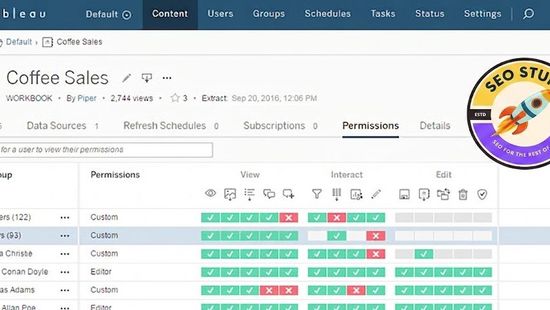
- Row-level security and user/group management
- Embedded analytics APIs to embed Tableau content in your own apps
- REST and JavaScript APIs for programmatic access
How Tableau Server Differs From Tableau Cloud
The two products are functionally similar but operationally very different.
Tableau Server (Self-Hosted)
- You install and operate the software yourself
- Runs on Windows or Linux (Server 2019/2022, RHEL/CentOS)
- You manage hardware, OS patches, Tableau upgrades, backups, scaling
- Sits on your network — easier to connect to internal data sources
- Pricing: license per user (Creator/Explorer/Viewer), perpetual or annual
Tableau Cloud (SaaS)
- Salesforce hosts and operates everything
- Web-only — no servers to manage
- Always on the latest version (managed upgrades)
- Internet-facing — connecting to internal data needs Tableau Bridge or gateway
- Pricing: subscription per user (Creator/Explorer/Viewer)
Key Trade-Off
Tableau Server gives you maximum control, on-premise data residency, and tight integration with internal networks. Tableau Cloud gives you zero ops burden and always-current features.
For most new customers in 2026, Tableau Cloud is the default unless you have specific reasons to self-host. The reasons that still drive Server adoption: data residency requirements, regulatory compliance, on-premise data sources that can't easily be exposed to the internet, or significant existing investment in the Server platform.
What's Included in Tableau Server
Tableau Server is licensed per user, with three seat types:
Creator
The most powerful seat. Includes:
- Tableau Desktop (Windows/Mac)
- Tableau Prep Builder (data preparation)
- Tableau Server access with full publishing rights
- All data source connections
- Pricing: ~$70-80/user/month equivalent (when licensed under enterprise agreement)
Explorer
For users who interact with content but don't build from scratch. Includes:
- Web authoring in Tableau Server (limited)
- Browse and interact with all published content
- Subscribe to scheduled views
- Pricing: ~$35-42/user/month equivalent
Viewer
For users who consume content but don't author. Includes:
- View and interact with dashboards
- Filter and drill within published views
- Receive email subscriptions
- Pricing: ~$12-15/user/month equivalent
Architecture and Components
Tableau Server is built from several distinct services. Understanding the architecture helps with deployment planning.
Core Services
- VizQL Server: renders visualizations
- Application Server: handles HTTP requests, authentication
- Cache Server: caches rendered views for performance
- Backgrounder: runs scheduled extracts, subscriptions, alerts
- Data Server: manages data source connections
- File Store: stores Tableau workbooks, extracts, metadata
- Repository (PostgreSQL): internal database for users, permissions, content
- Cluster Controller: coordinates multi-node deployments
Deployment Topologies
Tableau Server runs on a single node or a cluster:
- Single-node: all services on one machine. Suitable for <100 users.
- 3-node cluster: services distributed across three machines for high availability.
- Multi-node (4+): large enterprises, with backgrounders on dedicated nodes for scheduled refresh load.
Hardware Requirements (per node)
Minimum specs Tableau recommends:
- 8 CPU cores, 32GB RAM, 50GB SSD for production single-node
- Linux: Red Hat Enterprise Linux 7+, CentOS 7+, Ubuntu 18.04+
- Windows: Windows Server 2019 or 2022
Free SEO + AI Search Audit. Tableau Server requires real operational discipline. A free SEO audit takes 60 seconds and shows you exactly where your site stands. Get a free audit of how your site performs across Google AND every major AI search platform.
How to Install Tableau Server
A high-level overview of installation.
Step 1: Plan Your Deployment
Decide single-node vs cluster, OS (Linux vs Windows), authentication (local, Active Directory, SAML, OpenID), and database/data source connections needed.
Step 2: Provision Infrastructure
Spin up VM(s) meeting the hardware spec. Configure DNS, firewall rules, SSL certificates, and any required service accounts.
Step 3: Download Tableau Server
From the Tableau Customer Portal, download the installer for your OS. You'll need a current support contract.
Step 4: Install and Configure
Run the installer. The setup wizard walks through:
- Initial server configuration
- Identity store setup (local accounts, AD, etc.)
- Gateway and load balancer config (if clustered)
- SSL certificate setup
- Backup and recovery settings
Step 5: Add Users and Permissions
Create site admins, group structures, and permission models. Most organizations end up with role-based group hierarchies (Department > Team > Project).
Step 6: Connect Data Sources
Configure data source connections, credentials, and scheduled refresh cadences. For production data, use the Data Server feature to centrally manage credentials and avoid exposing them in individual workbooks.
Step 7: Publish Initial Content
Publish a starter dashboard or two to verify the install works end-to-end. Then onboard your analyst team.
When to Choose Tableau Server Over Tableau Cloud
Server makes sense in specific scenarios.
1. Data Residency Requirements
If regulatory or contractual requirements mean your data must stay in specific geographies or on specific networks, self-hosting Server in your own infrastructure may be the only option.
2. Regulatory and Compliance Constraints
Healthcare, finance, government, and defense often require systems to be deployed within specific accreditation boundaries (HIPAA, FedRAMP, FISMA, IL5, etc.). Tableau Server can be deployed inside these boundaries; Cloud might not meet your specific accreditation.
3. Internal Network Data Sources
If most of your data lives in databases that aren't internet-accessible (and you can't easily expose them via Tableau Bridge or gateway), Server inside your network is the cleaner option.
4. Heavy Customization Needs
If you need to deeply customize authentication flows, embed Tableau in proprietary applications, or integrate with internal monitoring/logging systems, Server gives you more control.
5. Existing Server Investment
Organizations with mature Tableau Server deployments, custom workflows, automation scripts, and operational expertise sometimes find migration to Cloud disruptive enough that Server remains the practical choice.
Free SEO + AI Search Audit. Operating Tableau Server is a real commitment. Most teams choose Cloud unless they have specific reasons. The same logic applies to many decisions — defaults matter. Run a free audit to see where your site stands by default in AI search.
Limitations of Tableau Server
Server is powerful but has real operational costs.
Hardware and infrastructure cost. Beyond Tableau licenses, you pay for servers, OS licenses, networking, storage, and the staff time to operate them. Total cost of ownership often runs 2-5x the license cost.
Upgrade complexity. Tableau releases major versions every 6 months. Each upgrade requires testing in a non-prod environment, scheduling downtime, validating after upgrade. Server admins spend significant time managing upgrades.
Scaling complexity. Moving from single-node to clustered Server is a real project. Multi-node clusters need load balancers, shared file storage, careful failover testing.
Disaster recovery is your job. Tableau Cloud has built-in DR. Server's DR is whatever you build — backup scripts, secondary sites, restoration drills.
Lag behind Cloud features. New features ship to Cloud first and Server second, often by 1-2 versions. If you need the newest capability, Server may not have it yet.
Authentication and SSO setup. Integrating Server with your IdP (Okta, Azure AD, ADFS, Ping) is straightforward but not zero effort. Plan for a week+ of admin time.
Tableau Server vs Tableau Cloud vs Power BI
A quick comparison.
Tableau Server
- Self-hosted, full control
- $70-80/Creator/month equivalent (enterprise pricing)
- Best for: regulated industries, on-prem data, existing Server shops
Tableau Cloud
- SaaS, fully managed
- $75/Creator/month
- Best for: most new deployments, fast time-to-value, modern data stacks
Power BI Premium / Fabric
- Microsoft's competing enterprise BI platform
- $20/Premium Per User/month or $4,995/month for P1 capacity
- Best for: Microsoft 365 organizations, tight Excel integration, cost-conscious teams
Final Thoughts
Tableau Server is the right choice if you have specific reasons to self-host — data residency, regulatory constraints, internal network data sources, deep customization needs. For most new deployments in 2026, Tableau Cloud is the better default. Either way, you get the same authoring experience in Tableau Desktop and the same fundamentally great visualization capabilities; the difference is who runs the infrastructure.
Once your BI infrastructure is set up, the next question for most businesses in 2026 is whether your content is reaching the right people. For most teams, traffic increasingly comes from buyers asking AI search engines like ChatGPT, Claude, Perplexity, and Gemini for product recommendations. Most teams have no measurement of where they stand in those AI answers. Run a free audit to see exactly where your site performs across Google AND every major AI search platform — and which fixes will move your traffic the fastest this quarter.


