
What Is Paid Search in Google Analytics? (2026 Guide)
 Carlos Garcia5/24/2026
If you've been working through Google Analytics 4 acquisition reports and seen "Paid Search" as a channel — and wondered exactly what that includes, how it differs from "Paid Social" or "Display," and where the data comes from — you're not alone. Paid Search in Google Analytics is sessions where the visitor clicked a paid text ad on a search engine results page (Google Search, Bing, or smaller search engines), distinguished from "Organic Search" (free clicks) by GA4's channel grouping rules; sessions land in Paid Search when they arrive with a Google Ads `gclid` parameter or a UTM medium value like `cpc`, `ppc`, or `paidsearch`. This guide explains exactly what Paid Search includes in GA4, how attribution works, how it differs from related channels, and how to read Paid Search reports correctly in 2026.
Free SEO + AI Search Audit. Paid Search drives high-intent traffic from search engines. A free SEO + AI search audit shows you where your *free* visibility lives — across Google AND in AI search engines like ChatGPT, Claude, Perplexity, and Gemini. Run your free audit → to see where your site stands in 60 seconds.
What Is Paid Search in GA4? The Direct Answer
In simple terms, Paid Search in GA4 is the default channel grouping that captures sessions where the user clicked a paid text ad on a search engine results page (SERP). The most common source: clicks on Google Search ads. Also included: Microsoft Ads (Bing), and any other search-engine paid traffic where you tagged the session with `utm_medium=cpc` (or `ppc`, `paid`, `paidsearch`).
GA4 distinguishes Paid Search from:
- Organic Search: free clicks from search engine results
- Paid Social: paid ads on Facebook, Instagram, LinkedIn, etc.
- Display: paid banner and image ads on the Google Display Network
- Direct: sessions with no detectable source
A session is classified as Paid Search when GA4 sees either:
- A `gclid` parameter on the landing URL (auto-tagged Google Ads search clicks), OR
- A UTM medium matching a "paid search" pattern: `cpc`, `ppc`, `paid`, `paidsearch`, or `sem`
What Counts as Paid Search Traffic
Several ad formats and surfaces roll up to "Paid Search" in GA4.
1. Google Search Text Ads
Standard text ads on Google Search results pages. The largest single source of paid search traffic for most accounts.
2. Microsoft Ads (Bing Search)
Bing's text ads, served on Bing Search, Yahoo Search (via the Microsoft partnership), DuckDuckGo (partial), and AOL Search. Tagged manually with UTMs since GA4 doesn't have native Microsoft Ads attribution.
3. Google Ads Shopping (Sometimes)
Google Shopping ads can appear in Paid Search depending on your channel grouping configuration. GA4's default channel group includes them under Paid Search; you can split them out in custom channel groups.
4. Performance Max Search Placements
Performance Max blends Search, Display, YouTube, Gmail, and Discovery. The search placement clicks within Performance Max get attributed to Paid Search.
5. Search Partners Network
Google's Search Partners network includes thousands of partner sites that show Google ads in their own search results (e.g., AOL, Ask.com). These click-throughs are also Paid Search.
6. International Search Engines With UTMs
If you advertise on Naver (Korea), Baidu (China), Yandex (Russia), or other regional search engines and use `utm_medium=cpc`, those clicks become Paid Search.
How GA4 Identifies Paid Search Traffic
The attribution mechanics.
Through Google Ads Auto-Tagging (Primary)
When auto-tagging is enabled in Google Ads (under Account settings), every ad click appends a `gclid` parameter to the landing URL. GA4 reads the `gclid`, looks up the matching campaign in linked Google Ads data, and identifies whether the campaign type is Search (vs Display, Shopping, Video, etc.).
Through UTM Parameters (Secondary)
For non-Google paid search (Microsoft Ads, Naver, etc.), you tag the landing URL with:
`utm_source=bing&utm_medium=cpc&utm_campaign=brand_terms_q1`
GA4 sees the `cpc` medium and classifies the session as Paid Search.
Through Default Channel Group Rules
GA4's default channel groupings define Paid Search as sessions where:
- `utm_medium` matches the regex `^(.*cp.*|ppc|retargeting|paid.*)$`
- AND `utm_source` matches a search engine (google, bing, yahoo, baidu, etc.)
- OR the matching Google Ads campaign type is Search/Performance Max-Search
You can customize the channel grouping rules in Admin → Property → Channel groups.
Where to Find Paid Search Reports in GA4
The specific places.
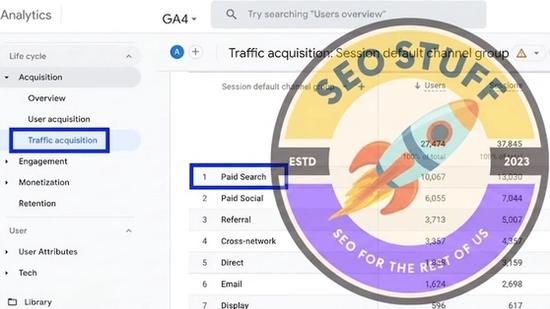
Acquisition → Traffic Acquisition
The main report. Filter or sort to find the Paid Search row. Add source/medium as a secondary dimension to see which specific search engines drove the traffic.
Advertising → Performance → All Campaigns
If Google Ads is linked, this report breaks down campaigns by spend, clicks, impressions, conversions, and ROAS.
Explorations
Build custom reports combining Paid Search with audience, device, geographic, or content dimensions for deeper analysis.
Conversion Paths
In Advertising → Attribution → Conversion paths, see how Paid Search interacts with other channels on the path to conversion (Paid Search → Organic Search → Direct, for instance).
Real-Time
Watch live Paid Search sessions land. Useful for confirming new campaigns are tagged correctly.
Free SEO + AI Search Audit. Paid Search captures users who searched for you. A free SEO + AI search audit captures whether AI search engines are recommending you in the first place. Get a free audit.
Paid Search vs Other Channels
How Paid Search compares to its closest cousins.
Paid Search vs Organic Search
- Paid Search: clicks on paid ads. You pay per click.
- Organic Search: free clicks from algorithmic search results. SEO work earns these.
- Intent overlap: same user, same query, different funnel position. Paid usually higher intent than organic for non-branded queries; the inverse for branded.
Paid Search vs Paid Social
- Paid Search: text ads on search engines, where users typed a query.
- Paid Social: image/video ads on Facebook, Instagram, LinkedIn, TikTok, where users were browsing.
- Intent: Paid Search is reactive (user searched first). Paid Social is interruptive (you appear in their feed).
Paid Search vs Display
- Paid Search: text ads on SERPs.
- Display: banner/image/rich-media ads on websites and apps in the Google Display Network.
- Intent: same paid medium, opposite intent levels.
Paid Search vs Direct
- Paid Search: properly attributed paid clicks.
- Direct: sessions with no source detected.
- Overlap: in-app ad clicks (mobile games, apps with embedded browsers) can strip the gclid, sending Paid Search traffic into Direct.
Paid Search vs Referral
- Paid Search: paid clicks on search engine ads.
- Referral: clicks from non-search third-party sites.
- Tagging gap: if a Paid Search click loses its gclid/UTMs, GA4 may classify it as Referral from the search engine's domain.
How to Read Paid Search Reports
Practical patterns.
1. Compare Paid Search to Organic Search Performance
Paid Search vs Organic Search comparison shows the relative value of paid vs free traffic from the same medium. Generally:
- Paid Search converts at higher rates (better landing pages, controlled targeting)
- Organic Search has higher volume long-term (more keywords, no per-click cost)
- The intent is similar at the source
2. Segment by Campaign
Add Session campaign as a secondary dimension. Compare conversion rate and ROAS across campaigns to find which paid search work is profitable.
3. Look at Device Performance
Mobile vs desktop Paid Search performance often varies significantly. Filter by device category to spot which devices need targeting adjustments.
4. Watch Branded vs Non-Branded Splits
If your account is heavily branded (lots of users searching your company name), branded paid search will dominate conversions and ROAS. Split out branded campaigns to see non-branded performance honestly.
5. Compare to Google Ads Reporting
GA4 and Google Ads measure clicks differently (GA4 measures sessions resulting from clicks; Ads measures click count). Small differences are normal; large gaps signal tagging or consent issues.
6. Track Assisted Conversions
Paid Search often plays an early-funnel role. Use the Conversion paths report to see how Paid Search interacts with later touchpoints.
Common Paid Search Attribution Issues
A few patterns to watch.
1. Paid Search Traffic Showing in "Direct"
In-app browser clicks (mobile games, embedded social browsers) frequently strip gclid. The session falls into Direct.
2. Paid Search Showing in "Referral"
If gclid is stripped AND UTMs aren't set, the session may be attributed to "google / referral" instead of "google / cpc / Paid Search." Always have UTM fallbacks.
3. Bing/Microsoft Ads Showing in "Organic Search"
If you haven't tagged Microsoft Ads with `utm_medium=cpc`, GA4 sees the session as a regular Bing click and classifies it as Organic Search. Tag explicitly.
4. Mixed Performance Max Attribution
Performance Max splits across channels. The search placements within PMax get attributed to Paid Search; display placements get attributed to Display. This makes Performance Max impossible to analyze as a single bucket without custom dimensions.
5. Wrong Account Linked
If your GA4 is linked to one Google Ads account but campaigns run in another, you'll miss cost data and have attribution gaps. Verify the Google Ads link in Admin → Product Links.
How to Improve Paid Search Performance
Practical levers.
1. Match Search Intent
Make sure ad copy and landing pages match what the user typed. Mismatches kill quality score and conversion rate.
2. Use Negative Keywords
Block irrelevant queries. Audit search terms reports weekly and add bad matches as negatives. Smaller, higher-quality traffic outperforms broader, lower-quality.
3. Improve Quality Score
Higher CTR, better landing experience, and tighter ad-to-keyword match all lift Quality Score, which lowers CPC and improves ad placement.
4. Bid for Conversions, Not Clicks
Switch from manual CPC to target CPA, target ROAS, or maximize conversions bidding. Algorithmic bidding usually outperforms manual at scale.
5. Segment Branded vs Non-Branded
Use separate campaigns for branded and non-branded keywords. Branded campaigns are usually cheap and convert well; non-branded need more optimization work.
6. Add Ad Extensions
Sitelinks, callouts, structured snippets, and price extensions all increase ad real estate and CTR.
Free SEO + AI Search Audit. Paid Search captures intent that's already there. AI search shapes intent before users even reach a search box. Run a free audit of how your site performs across Google AND every major AI search platform.
Limitations of Paid Search Data in GA4
A few honest caveats.
Cost data is Google-Ads-only by default. Microsoft Ads, Naver, and other paid search platforms won't have cost data in GA4 unless you import it manually via Data Import.
24-hour cost data lag. Same-day Paid Search cost numbers in GA4 are usually incomplete.
Modeled vs raw attribution. GA4 uses data-driven attribution by default for Paid Search reports. The numbers include modeled data for consent-denied users.
Privacy consent affects it. Users who decline analytics consent aren't visible in GA4 reports but their clicks still count in Google Ads. This causes apparent mismatches between Ads and GA4 numbers.
Performance Max obscures granular reporting. PMax campaigns blend channels; the channel-level Paid Search attribution from PMax is approximate.
Paid Search vs AI Search (A 2026 Caveat)
A note on a fast-moving 2026 trend.
GA4's "Paid Search" channel was designed for the world of text ads on Google and Bing. In 2026, a growing share of buyer-intent searches now happens inside AI search engines (ChatGPT, Claude, Perplexity, Gemini). These don't yet have paid ad ecosystems comparable to Google Ads — meaning:
- You can't currently buy "Paid Search" placement in AI search engines (with some exceptions on Perplexity and limited Microsoft/Bing/ChatGPT integrations)
- AI search traffic still lands in GA4 as Direct or Referral, not Paid Search
- The Paid Search channel in GA4 is essentially "paid clicks from traditional search engines"
Expect this to evolve as AI search platforms launch ad products (Perplexity already has some, and OpenAI has been rolling out commerce features).
Final Thoughts
Paid Search in Google Analytics is sessions from paid text ads on search engines — primarily Google Search, but also Bing, Naver, and other search platforms. GA4 attributes Paid Search via the `gclid` parameter (for Google Ads auto-tagged sessions) or via `utm_medium=cpc/ppc/paid/etc.` for other search ad platforms. Read it through the Traffic Acquisition report, segment by campaign and device for deeper analysis, and compare to Organic Search to understand the relative value of paid vs free search visibility. Remember that Performance Max blends Paid Search with other channels, and that in-app ad clicks can leak Paid Search traffic into the Direct channel.
Beyond traditional paid search, the bigger 2026 question for most marketing teams is whether your audience is even using search engines anymore. Increasingly, buyer research happens in AI search engines like ChatGPT, Claude, Perplexity, and Gemini — channels where your existing Paid Search budget doesn't reach and your organic visibility may be invisible. Run a free audit to see exactly where your site performs across Google AND every major AI search platform — and which fixes will move your traffic the fastest this quarter.


