What Does Referral Mean in Google Analytics 4? (2026 Guide)
 Carlos Garcia5/28/2026
Referral in Google Analytics means someone reached your site by clicking a link on another website or app that GA4 doesn't treat as search, social, or advertising. GA4 stores the linking site as the source (for example, example-blog.com) and sets the medium to referral. In the default channel group, any session with a medium of referral, app, or link lands in the Referral channel.
The rest of this guide covers where to find it in GA4, why your own domain or PayPal keeps showing up there, how it differs from Direct and Organic Social, and where ChatGPT traffic goes now that GA4 has an AI Assistant channel.
What Referral Means in Google Analytics
Google's own description is short: Referral is "the channel by which users arrive at your site via non-ad links on other sites/apps (e.g., blogs, news sites)."
In your reports, a referral shows up as a source / medium pair, such as example-blog.com / referral. The source is the domain that sent the visitor. The medium tells GA4 what kind of traffic it was.
Typical referral sources:
- A blog post or news article that links to one of your pages
- A directory, review site, or partner site
- A forum or community site that isn't on Google's list of social sites
- A link inside a web app or online tool
- Your own payment provider or second domain, when tracking isn't set up correctly (more on that below)
What isn't referral: clicks from search results, links from social networks, tagged ad clicks, and tagged email links. Those all have their own channels, even though they technically come from another website too.
How GA4's Default Channel Group Defines Referral
GA4 sorts every session into a channel using fixed rules that you can't edit. The Referral rule is one line: the medium is one of referral, app, or link. If you want the full list of medium values and what they mean, see our guide to the mediums available in Google Analytics.
The rule doesn't look at the source domain. Other channels do. Organic Search catches sources on Google's list of search sites, and Organic Social catches sources on its list of social sites. So links from search engines and social networks are grouped there, and Referral ends up holding most of the other links.
One side effect: a campaign link tagged with utm_medium=link or utm_medium=app can end up in Referral too, since those mediums match the same rule.
Where to See Referral Traffic in GA4
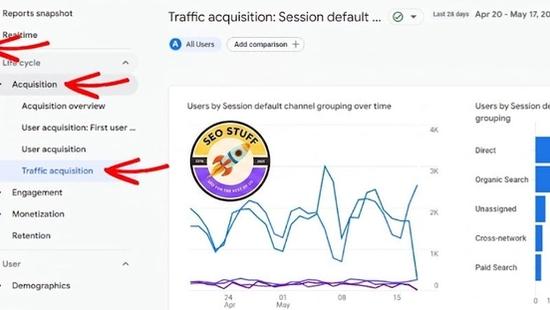
The Traffic acquisition report is the main place to look.
- In GA4, click Reports, then Acquisition, then Traffic acquisition. In many properties, Acquisition sits inside the Life cycle section of the left menu.
- By default, the table is grouped by channel (the Session default channel group dimension). The Referral row is your total referral traffic for the date range.
- To see which sites sent it, use the dropdown at the top of the first column to change the primary dimension to Session source / medium.
- Type referral into the search box above the table to filter the list down to referral rows.
If you only care about how new users first found you, use the User acquisition report instead. It counts new users only and uses first-user dimensions such as First user source / medium. Traffic acquisition counts every session, from new and returning users alike.
How to See the Full Referring URL
Session source only gives you the domain. To see the page a visitor came from, build an exploration and add the Page referrer dimension. Google defines it as the user's previous URL, which can be your own domain or another site.
Expect gaps. Most browsers now default to a referrer policy called strict-origin-when-cross-origin, which sends only the origin (the domain) when someone clicks from one HTTPS site to another, and sends nothing at all when the click goes from HTTPS to HTTP. So unless the linking site sets its own policy, the domain is often all you get.
For a broader look at the values you'll see in the source column, read what sources are available in Google Analytics.
If you want to see how your site shows up in Google and AI search, not just who links to you, request a free SEO and AI search audit.
Why Your Own Site, PayPal, or Stripe Shows Up as a Referral
These are unwanted referrals. They inflate the Referral channel and take credit away from whatever actually brought the visitor in, like a Google search or an email.
The usual causes:
- Payment processors. A buyer leaves your site to pay on a third-party payment page, then returns to your confirmation page. The return trip gets recorded as a referral from the payment domain. Google lists payment processors as a common reason to use the unwanted referrals setting.
- Your own subdomains. If two subdomains don't use the same cookie domain, moving between them can show up as a self-referral. Google's fixes are to make sure all subdomains share one cookie domain, or to list the subdomain as an unwanted referral.
- A second root domain you own. A separate store, booking engine, or app domain can show up as a referrer unless you set up cross-domain measurement.
How to Fix It With "List Unwanted Referrals"
GA4 calls this setting List unwanted referrals. It's the GA4 version of what many people still call a referral exclusion list.
- Go to Admin, then Data collection and modification, then Data streams.
- Select Web and click your web data stream.
- Click Configure tag settings at the bottom of the stream details.
- In the Settings section, click Show all.
- Click List unwanted referrals.
- Choose a match type and enter the domain, for example paypal.com. Click Add condition for each extra domain.
- Click Save.
When a visit matches, GA4 adds ignore_referrer=true to the event, so that domain isn't used as the traffic source. You can add up to 50 unwanted referrals per data stream.
Only add domains that are part of your own flow, like payment pages or your own other domains. Adding a normal referrer here just hides a real traffic source.
Set Up Cross-Domain Measurement for Your Other Domains
If visitors move between two root domains you own, such as example.com and example-shop.com, set up cross-domain measurement. Without it, Google says one visitor on the same device gets counted as two users and two sessions.
- Go to Admin, then Data collection and modification, then Data streams, and click your web data stream.
- Click Configure tag settings.
- Click Configure your domains.
- Accept the detected domains or click Add condition to add each domain.
- Click Save.
Once it's working, links between your domains carry a _gl parameter in the URL. GA4 automatically excludes traffic that arrives with that linker from a configured domain, so those visits won't show up as referrals.
Once your referral numbers are clean, get a free SEO audit to see where your pages actually stand in Google and AI search.
Referral vs Direct vs Organic Social
Most confusion about Referral comes from the channels next to it. Here is what separates them in GA4's rules.
Referral vs Direct
Direct means the source is exactly (direct) and the medium is (none) or (not set). In practice, GA4 has nothing to go on: no referrer and no campaign tags. That covers typed URLs and bookmarks, but also links from places that don't pass referrer information, like many mobile apps.
So the same link can be Referral or Direct depending on whether the referrer survived the click. Our guide on what Direct means in Google Analytics covers what else ends up in that bucket.
Referral vs Organic Social
Organic Social catches sessions where the source matches Google's list of social sites, or where the medium is social, social-network, social-media, sm, social network, or social media.
A link from a social network lands in Organic Social. A link from a forum or community site that isn't on Google's list lands in Referral. If you share links on a platform you think GA4 might miss, tag them with utm_medium=social and they'll land in Organic Social either way.
Referral vs Organic Search
Organic Search covers sources on Google's list of search sites, plus any session with a medium of organic. A click from a search engine's results is Organic Search, not Referral, even though the visitor technically came from another website.
Referral vs Affiliates and Email
Affiliates needs a medium of affiliate. Email needs email (or a variant like e-mail) as the source or the medium. Untagged partner and newsletter links don't meet either rule, so they fall into Referral or Direct instead. If you pay partners per sale, tag their links with utm_medium=affiliate.
Why AI Tools Like ChatGPT and Perplexity Show Up as Referral
An AI chat tool is another website linking to you. When someone clicks a cited link in a browser-based AI tool, the browser usually passes that tool's domain as the referrer. Those domains aren't on GA4's search or social lists, so for a long time they matched the Referral rule like any blog would.
Google's help docs show this too. Its instructions for building a custom "AI assistants" channel tell you to place it above Referral, because GA4 assigns traffic to the first channel whose rule it matches.
GA4's AI Assistant Channel
On May 13, 2026, Google added an AI Assistant channel to the default channel group. When the referrer matches Google's list of AI assistants, GA4 sets the medium to ai-assistant and the campaign to (ai-assistant), and the session goes into the AI Assistant channel instead of Referral.
Google's help page names ChatGPT, Gemini, Deepseek, Copilot, and Grok as examples. It also says the channel excludes Google's own AI Overviews and AI Mode.
Why AI Traffic Can Still Land in Referral or Direct
The new channel doesn't catch everything:
- Older date ranges. The change applies going forward, so reports covering dates before May 13, 2026 still show AI visits under Referral. Comparing periods across that date can show Referral dropping even if nothing else changed.
- Tools that aren't on the list. Google hasn't published the full list of AI assistants it recognizes. If perplexity.ai / referral or another AI domain still appears in your Referral rows, GA4 isn't matching it.
- Clicks with no referrer. Clicks from apps, or links people copy and paste, often arrive without referrer information. Those land in Direct, not Referral or AI Assistant.
To catch the gaps, create a custom channel group in Admin, under Data display, then Channel groups. Add a channel that matches the AI domains you still see in Referral and place it above Referral. Custom channel groups can be applied to your reports retroactively, so this also sorts out your pre-May 2026 data.
If you want more of this traffic in the first place, start with how to get cited in ChatGPT, Claude, and other AI search tools.
To see whether ChatGPT, Perplexity, and Gemini actually mention your brand, run a free AI search audit.
How to Read Your Referral Data
Once the unwanted referrals are cleaned out, the Referral channel is a list of sites that sent you real visitors. A few things are worth checking regularly.
- Rank referrers by outcomes, not sessions. A small site that sends ten visitors who buy is worth more than a big one that sends a thousand who leave.
- Look into new referrers. A domain you haven't seen before usually means a new link or mention. Find the page and see what was said.
- Watch for junk. GA4 automatically excludes traffic from known bots and spiders, and you can't switch that off. Unknown junk can still get through, so a referrer with lots of sessions and almost no engagement deserves a closer look.
- Compare with your backlink data. The links that send real visits are the ones worth protecting and building on.
If you want to know which of your pages are closest to page 1 and what's holding them back, get a free SEO audit.
Frequently Asked Questions
What does referral mean in Google Analytics?
It means a visitor clicked a link on another website or app to reach yours, and GA4 didn't classify that site as search, social, or ads. In GA4's default channel group, a session counts as Referral when its medium is referral, app, or link.
What is the difference between direct and referral traffic?
Referral traffic arrives with a referrer, so GA4 knows which site sent it. Direct traffic arrives with no referrer and no campaign tags, which covers typed URLs, bookmarks, and links from apps that strip referrer data.
How do I find where referral traffic is coming from in GA4?
Go to Reports, then Acquisition, then Traffic acquisition, and change the primary dimension to Session source / medium. Search the table for referral to list each referring domain. For the full referring URL, use the Page referrer dimension in an exploration.
Why is my own website showing as a referral?
Usually because visitors pass through a payment page, a second domain you own, or a subdomain with a different cookie domain, and GA4 records the return trip as a referral. Fix it with List unwanted referrals in your web stream's tag settings, and set up cross-domain measurement for any other domains you own.
Why does ChatGPT show up as referral traffic in GA4?
Before May 13, 2026, GA4 had no AI channel, so clicks from chatgpt.com matched the Referral rule like any other website. GA4 now sends recognized AI assistants to an AI Assistant channel, but older data and tools Google doesn't recognize still show up as Referral.
Final Thoughts
Referral is GA4's label for visits from links on other sites. Most of the work is cleanup: remove payment pages with List unwanted referrals, connect your own domains with cross-domain measurement, and keep an eye on AI tools that slip past the new AI Assistant channel. What's left is a list of sites that actually send you visitors, and that's worth checking every month.
Want this done for you?
SEO Stuff gets businesses cited by ChatGPT, Gemini, Perplexity and Claude, and ranking in Google. Start with the free audit, a call, or the package.
See where you stand
A free, manual SEO + AI search audit of your site, with a report within 48 hours. No credit card, no sales call.
Get the free auditTalk it through
A free 20-minute call with the founder about whether AI search is a meaningful opportunity for your business.
Book a callHave it done
The Done-For-You Package: audit, 10 pages of content, 3 DR50+ placements, dashboard. $999 once, delivered in 21 business days.
See the package

