
What Does Direct Mean in Google Analytics? (2026 Guide)
 Carlos Garcia5/23/2026
If you've ever opened your Google Analytics 4 traffic acquisition report and seen a big chunk of sessions tagged "Direct," you've probably wondered what that actually means, where those visitors came from, and why the number sometimes feels suspiciously high. Direct traffic in Google Analytics is sessions where GA4 cannot detect a referring source — visitors arrived at your site with no traceable source URL, no campaign tag, and no referrer header. This guide explains what Direct really means in 2026, what causes it, why it's almost always inflated by "dark traffic," and how to investigate and reduce it.
Free SEO + AI Search Audit. Direct traffic hides what's actually driving visitors to your site. A free SEO + AI search audit reveals where your real visibility is — across Google AND in AI search engines like ChatGPT, Claude, Perplexity, and Gemini. Run your free audit → to see where your site stands in 60 seconds.
What Does "Direct" Mean in Google Analytics?
In simple terms, Direct traffic in Google Analytics 4 is the bucket GA4 assigns to a session when it can't identify any other source. It is not a single behavior — it's the fallback category when GA4's source detection comes up empty.
GA4 classifies a session as Direct when all of the following are true at session start:
- No `utm_*` parameters in the landing URL
- No referrer URL in the HTTP header
- No matching Google Ads click ID (gclid)
- No previous campaign attributed to the user within the lookback window
When none of those signals exist, GA4 has no way to know how the visitor got to your site, so the session is bucketed into "Direct / (none)" under traffic source and medium.
What Actually Causes Direct Traffic
Direct does not just mean "the user typed your URL." That's part of it, but most Direct traffic comes from sources GA4 simply can't see.
1. Genuinely Direct Visits
Users who typed your domain in the address bar, clicked a browser bookmark, or accessed your site through an existing browser tab. This is the textbook definition but a minority of real Direct traffic for most sites.
2. App-to-Web Clicks
Clicks from native mobile apps (Slack, Discord, Outlook desktop, WhatsApp, Telegram, iMessage, in-app browsers) often strip the referrer header. GA4 sees a session with no source and labels it Direct.
3. HTTPS-to-HTTP Transitions
When a user clicks a link from an HTTPS site to an HTTP site (rare in 2026 but still happens), browsers strip the referrer for privacy. GA4 records the session as Direct.
4. AI Search Engine Citations
Visitors clicking links from ChatGPT, Claude, Perplexity, Gemini, and other AI search interfaces often arrive without a clean referrer — depending on how the AI surfaces the citation and which browser/app the user is in. This is a fast-growing source of Direct traffic in 2026.
5. Email Clicks Without UTM Tags
Email clients (especially desktop Outlook, native mobile mail apps) frequently strip referrers. If you don't tag email links with UTM parameters, GA4 buckets the resulting sessions as Direct.
6. Documents and PDFs
Links inside Word documents, PDFs, Excel files, and other downloaded documents don't pass a referrer. Clicks from these documents always show up as Direct.
7. Privacy-Focused Browsers
Browsers like Brave, Tor, and DuckDuckGo's mobile browser strip or anonymize referrers by default. Users on these browsers contribute to Direct even when they came from search engines.
8. Misconfigured Tracking
If GA4's tracking code is missing from a landing page, the session may start on a deeper page where the original referrer is no longer available. The session you see in GA4 starts mid-funnel with no source.
Direct vs Organic Search vs Referral
Where does Direct fit relative to the other channels?
Direct / (none)
No detectable source. Could be anything from a typed URL to an untagged AI search engine citation.
Organic Search
Session originated from a search engine results page (Google, Bing, DuckDuckGo, Yahoo) where GA4 detected the search-engine referrer. As of 2026, GA4 increasingly classifies traffic from AI search interfaces (when properly attributed) as Organic Search rather than Direct.
Referral
Session originated from a non-search website that passed a referrer GA4 doesn't recognize as a search engine, social network, or paid channel.
Organic Social
Session originated from a social platform GA4 recognizes (LinkedIn, Facebook, Reddit, X, etc.).
Paid Search / Paid Social / Display
Sessions with a recognized click ID (gclid, fbclid) or campaign parameter indicating paid media.
How to Investigate Your Direct Traffic
Most marketers see their Direct number and accept it. You don't have to.
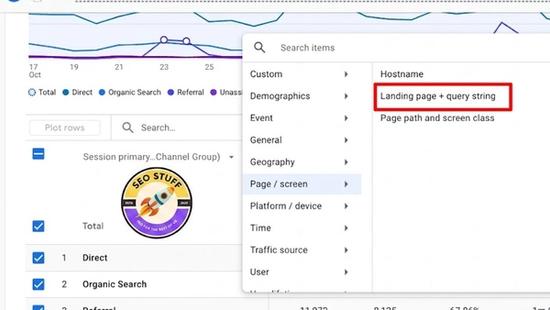
Step 1: Segment by Landing Page
In GA4, build an exploration where Direct sessions are filtered by landing page. If you see specific deep pages getting Direct traffic that doesn't get equivalent Organic traffic, that's a flag for app-to-web clicks, untagged email, or AI search referrals.
Step 2: Compare Geographic Distribution
Genuinely-Direct traffic skews toward your existing customers and brand-aware audiences. If your Direct traffic shows a country mix wildly different from your overall traffic, that's evidence the bucket is collecting other-channel sessions.
Step 3: Look at User Behavior Patterns
Direct sessions with very short durations and high bounce rates often come from app-to-web clicks where users tap a link out of curiosity and bounce back. Direct sessions with deep engagement often reflect returning customers or AI-search-driven visitors with strong intent.
Step 4: Cross-Reference With Search Console
If your Direct landing pages correlate with pages that have rising search impressions in Google Search Console, some of that Direct is likely Google traffic with a stripped referrer.
Free SEO + AI Search Audit. Direct traffic obscures where your real visitors come from. A free SEO + AI search audit gives you ground truth on how you're showing up across Google AND every major AI search platform. Get a free audit.
How to Reduce Inflated Direct Traffic
You can't make Direct zero, but you can dramatically reduce the inflated portion.
1. UTM-Tag Every Outbound Link You Control
Email campaigns, social posts, paid media, in-product CTAs, partner co-marketing links — anything you publish should carry UTM parameters. This routes those sessions to their correct channels instead of Direct.
2. Force HTTPS Site-Wide
If your site mixes HTTPS and HTTP, every HTTPS-to-HTTP redirect strips the referrer. Enforce HTTPS on every page.
3. Verify Cross-Domain Tracking
If users move between multiple domains you own (main site → checkout subdomain → support portal), make sure cross-domain tracking is configured. Otherwise transitions between your domains create Direct sessions.
4. Use a Tag Manager Across All Properties
Ensure GA4 fires on every page on every property you own. Gaps in tag deployment create artificially Direct sessions when users land on un-tagged pages and navigate to tagged ones.
5. Tag Document and PDF Links
When you publish links inside PDFs, Word docs, or downloadable files, add UTM parameters to them. Document-linked traffic is otherwise always Direct.
6. Add Source Detection for AI Search
Most AI search interfaces don't yet pass a clean referrer. You can build a custom dimension that captures landing-page URL + a parameter you append to your sitemap URLs (e.g., `?ai=1` on URLs you submit specifically for AI ingestion) to start separating AI traffic from typed-URL Direct.
When Direct Traffic Is a Good Sign
Not all Direct is bad — for many sites it's a marker of brand strength.
1. Brand-Aware Customers
People who type your URL or use bookmarks are usually existing customers or strong-intent prospects. High Direct from your established audience is a sign of brand equity.
2. Email and Newsletter Recipients
If you have a strong email list and not all your links are UTM-tagged, Direct will be elevated by your email program. That's not "bad" — it's just under-attributed value.
3. Returning Customers
A large Direct bucket combined with high returning-user counts is a healthy sign — your customers come back without needing prompting.
4. AI Search Citations (in 2026)
In 2026, a growing portion of Direct represents AI-search-driven visitors who can't yet be properly attributed. As AI search engines become more dominant in B2B and consumer buying research, more of your "Direct" will quietly be AI traffic.
Limitations of Direct Traffic as a Metric
A few honest caveats.
It's always under-attributed. No matter how clean your UTM tagging, some sessions will land as Direct because the user's environment stripped the referrer. Accept a 10-30% floor.
It varies by industry. B2B sites tend to have higher Direct from customer relationships and document/PDF links. Consumer e-commerce sites tend to have lower Direct as a percentage of total.
It's a lagging signal. Direct traffic moves slowly — a brand-awareness campaign takes weeks to show up in elevated Direct. Don't expect immediate movement.
GA4's attribution model affects it. GA4 uses data-driven attribution by default, which can re-attribute some Direct sessions back to upstream channels in conversion reports. The Acquisition reports show raw Direct; conversion reports show modeled Direct. They will not match.
You can't trust it as a stand-alone "loyalty" metric. Until you've cleaned up your tagging, your Direct number is inflated by under-attribution as much as it reflects genuine loyalty.
Free SEO + AI Search Audit. Most Direct traffic is just under-attributed Organic and AI search visits. A free SEO + AI audit gives you a real picture. Run a free audit of how your site performs across Google AND every major AI search platform.
Direct vs Other Underrated GA4 Sources
A quick comparison.
Direct / (none)
- What it is: sessions with no detectable source
- Inflated by: app-to-web, untagged email, AI search, privacy browsers
- Improve by: UTM tagging everything you control
(other)
- What it is: sessions GA4 saw a source for but couldn't classify into a known channel
- Common cause: misspelled UTM mediums, custom channels not configured
- Improve by: standardize UTM conventions, configure custom channel groupings
Organic Search
- What it is: search engine sessions GA4 recognized
- Often combined with: AI search citations that pass a clean referrer
- Improve by: SEO and content optimization
Unassigned
- What it is: sessions GA4 hasn't processed yet or couldn't process due to consent denial
- Improve by: review consent mode setup; allow processing time
Final Thoughts
Direct traffic in Google Analytics is not a single signal — it's the bucket GA4 uses when it doesn't know where a visitor came from. In 2026, with AI search engines, privacy browsers, and app-to-web traffic all stripping referrers, Direct is increasingly inflated by sources that aren't actually "direct" at all. The fix is two things: tag everything you control with UTMs, and accept that some portion of Direct will always be a stand-in for AI search and other under-attributed channels.
For most teams in 2026, the bigger question isn't really what Direct means — it's how much of it is actually AI search engines like ChatGPT, Claude, Perplexity, and Gemini sending traffic without proper attribution. If you have no measurement of how you're showing up in those AI answers, you're treating a growing portion of your real audience as anonymous. Run a free audit to see exactly where your site performs across Google AND every major AI search platform — and which fixes will move your traffic the fastest this quarter.


