What Does a LinkedIn Ad Look Like? (2026 Guide)
 Carlos Garcia5/24/2026
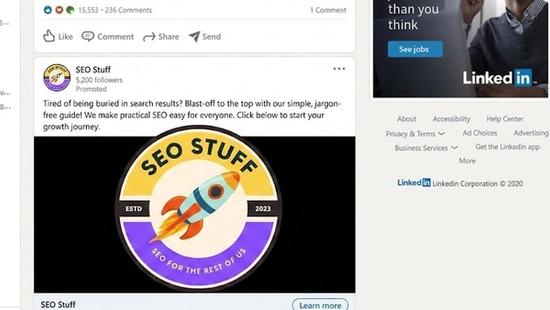
If you've been browsing LinkedIn and wondered which posts in your feed are actually ads — or you're planning to advertise on LinkedIn and want to know what the finished ad will look like to your audience — you're not alone. A LinkedIn ad typically looks like a normal LinkedIn post in the feed (with a profile photo, company name, headline, body copy, and image or video), distinguished from regular content only by a small grey "Promoted" label below the company name; LinkedIn supports several ad formats — Sponsored Content (single-image, video, carousel, document, event), Sponsored Messaging (Message and Conversation ads sent directly to user inboxes), Text Ads (small right-rail ads on desktop), Dynamic Ads (personalized based on viewer profile), and the newer Thought Leader and Click-to-Message ads — each with its own visual style and placement. This guide walks through what every LinkedIn ad format actually looks like in 2026, with the design specs, placement, and what distinguishes ads from organic content.
Free SEO + AI Search Audit. LinkedIn ads put your brand in front of B2B buyers. A free SEO + AI search audit shows whether those same buyers can find your site organically — across Google AND inside AI search engines like ChatGPT, Claude, Perplexity, and Gemini. Run your free audit → for a 60-second visibility snapshot.
What Does a LinkedIn Ad Look Like? The Direct Answer
In simple terms, a LinkedIn ad is a piece of paid content that appears in a LinkedIn user's feed, inbox, or sidebar, designed to look as close as possible to native LinkedIn content — but flagged with a small "Promoted" label so users can tell it's paid. The exact look depends on the ad format and placement.
The standard markers of a LinkedIn ad:
- A company name and profile photo at the top (the advertiser's Page)
- A small grey "Promoted" label directly below the company name
- A headline (or message subject, in messaging ads)
- Body copy
- Visual creative (image, video, carousel, document, etc.)
- A call-to-action button (Learn More, Sign Up, Apply, Visit Website, etc.)
Compared to a regular post, the only visible giveaways are the "Promoted" label and the CTA button — everything else mirrors organic content.
The Main LinkedIn Ad Formats
What each one looks like.
1. Sponsored Content (Single-Image Ads)
The most common LinkedIn ad format. Appears in the desktop and mobile feeds as a regular post.
What it looks like:
- Company logo + name at top
- Small "Promoted" label
- 1-3 lines of text copy (headline + body)
- Single image (1200×627 pixels recommended)
- CTA button at bottom (Learn More, Download, etc.)
Visually it's nearly indistinguishable from an organic company page post — except for the "Promoted" tag and the prominent CTA button.
2. Sponsored Content (Video Ads)
Same feed placement as single-image ads, but with a video creative.
What it looks like:
- Company logo + name
- "Promoted" label
- Text copy
- Video player (autoplays muted by default)
- CTA button below the video
Videos play in-feed; users tap to unmute. Captions are strongly recommended since most LinkedIn videos are watched silently.
3. Sponsored Content (Carousel Ads)
Multi-card image format. Users swipe horizontally through 2-10 cards in a single ad.
What it looks like:
- Company logo + name
- "Promoted" label
- Headline above the carousel
- Swipeable card stack (each card with its own image, optional headline, and destination URL)
- "See More" CTA at the end
Carousels work best for storytelling, product line showcases, or step-by-step explanations.
4. Sponsored Content (Document Ads)
A unique LinkedIn format. Users can flip through (or download) a PDF directly in-feed.
What it looks like:
- Company logo + name
- "Promoted" label
- Document preview thumbnail
- Page-flip interface (users swipe through pages)
- "Download" CTA after a few page flips (often gated for lead capture)
Document ads are powerful for ebooks, whitepapers, case studies, and reports.
5. Sponsored Content (Event Ads)
Promotes a LinkedIn Live event, webinar, or in-person event.
What it looks like:
- Event banner image
- Event title, date, time, and host info
- "Attend" CTA button
- Often shows which connections of yours have also registered (social proof)
6. Sponsored Messaging (Message Ads)
Direct-inbox ads sent to LinkedIn users as if they were personal messages from a sender (often a real person at the advertising company).
What it looks like:
- Appears in the user's LinkedIn inbox
- "Sponsored" label at the top of the message
- A custom message from a sender (typically a sales rep)
- 1-2 CTA buttons at the bottom (Learn More, Schedule a Demo)
Message ads have been controversial because they feel more intrusive than feed ads. LinkedIn has progressively reduced their frequency.
7. Sponsored Messaging (Conversation Ads)
A more interactive version of Message ads. Users see a chat-like flow with multiple CTA branches.
What it looks like:
- Inbox message with a "Sponsored" label
- Conversation starts with a question/intro from the sender
- Multiple CTA buttons branch into different paths (each leading to a different landing page, lead form, or follow-up message)
- Users navigate by tapping buttons (no typing required)
Used heavily for tiered nurturing — different paths for different buyer personas.
8. Dynamic Ads (Follower, Spotlight, Content)
Personalized ads that use the viewer's LinkedIn profile data dynamically.
What it looks like:
- Right-rail ad on desktop (above the fold)
- Often includes the viewer's own profile photo + a personalized message ("[Your Name], [Company] is hiring")
- Custom CTA
Available in three sub-types:
- Follower Ads ("Follow our Company")
- Spotlight Ads (driving to a custom landing page)
- Content Ads (highlighting downloadable content)
9. Text Ads
Simple text-and-image ads in the right column on desktop.
What it looks like:
- Small image thumbnail (50×50 pixels)
- Headline (max 25 characters)
- Description (max 75 characters)
- "Ad" label
- Located in the right sidebar or below the main feed
The most cost-efficient but least visually rich format. Often used for retargeting or low-cost test campaigns.
10. Thought Leader Ads (TLA)
A newer format introduced in 2023 and expanded in 2024-2025. Promotes an organic post from an executive or employee personal profile, not the company page.
What it looks like:
- Personal profile (not company) photo at the top
- The person's name and title
- "Promoted" label
- The original organic post copy and creative
- CTA button (Learn More, Visit Website)
Thought Leader Ads tend to outperform standard company posts because they feel more authentic and personal.
11. Click-to-Message Ads
A 2024-2025 format that drives users into a LinkedIn DM conversation with the advertiser.
What it looks like:
- Standard Sponsored Content in feed
- CTA button reads "Send Message" or similar
- Tapping opens a pre-filled message thread with the advertiser's chosen contact
Used for high-touch B2B outreach and demo booking.
12. Lead Gen Form Ads
Sponsored Content with a built-in lead capture form. The form pre-fills with the user's LinkedIn profile data.
What it looks like:
- Standard Sponsored Content
- CTA button reads "Submit," "Download," "Sign Up," etc.
- Tapping opens a slide-up form pre-populated with name, email, company, job title
- User confirms with one tap (no manual typing)
Lead Gen Forms have some of the highest conversion rates on LinkedIn because friction is so low.
Free SEO + AI Search Audit. LinkedIn ads target a slice of B2B intent. A free SEO + AI audit catches the rest — including which AI search engines are recommending your brand and which competitors are getting cited instead. Get a free audit.
How a LinkedIn Ad Differs From a Regular LinkedIn Post
The visual cues that distinguish them.
"Promoted" Label
Every paid ad shows a grey "Promoted" tag below the company or person name. This is the single most reliable visual marker.
Prominent CTA Button
Organic posts can have buttons (e.g., "View Profile," "Connect"), but Sponsored Content always has a prominent CTA bar at the bottom of the ad (Learn More, Sign Up, Download, etc.).
Pre-filled Lead Forms
Tapping a CTA on an organic post usually navigates externally. Tapping a CTA on a Lead Gen Ad opens a pre-filled in-platform form.
Right-Rail Placement
Text Ads and Dynamic Ads appear in the right column — a space reserved for ads, not organic feed content.
Inbox Messages With "Sponsored" Tag
Real messages don't carry a "Sponsored" label. Inbox ads do.
Higher Polish
Ads tend to have professionally produced imagery, branded colors, and structured copy. Organic posts vary widely.
Where LinkedIn Ads Appear
The placements within LinkedIn.
Desktop Feed
Sponsored Content (image, video, carousel, document) appears interspersed with organic posts — typically one ad every 4-6 posts.
Mobile Feed
Same as desktop but vertically scrolled. Video and carousel ads work especially well on mobile.
LinkedIn Inbox
Sponsored Messaging (Message ads, Conversation ads) appears in the messages list.
Right Rail (Desktop Only)
Text Ads and Dynamic Ads sit in the right sidebar.
LinkedIn Audience Network (LAN)
Some Sponsored Content extends beyond LinkedIn.com to partner apps and sites. These ads still carry LinkedIn branding but appear outside the platform.
LinkedIn Pulse Articles
Sponsored Content can appear within LinkedIn's article reader.
LinkedIn Live and Events
Event Ads appear in event discovery surfaces.
How to Recognize When You're Being Targeted
Practical signals.
Industry-Specific Ads
If your LinkedIn profile lists "Software Engineer at FinTechCo," you'll see software dev tool ads, recruitment ads, and finance industry SaaS ads — even if they have nothing to do with your specific job.
Account-Based Marketing (ABM) Ads
If an enterprise SaaS company is targeting your specific company, you'll see their ads frequently across many days. This is ABM at work.
Retargeting Ads
If you visit a SaaS company's website, you'll start seeing their LinkedIn ads. They're retargeting based on your web visit.
Recruitment Ads
Talent sourcing ads target by current title, company, location, skills, and seniority.
Personalized Dynamic Ads
If you see an ad with your own name or photo in it, that's a Dynamic Ad pulling your profile data.
Free SEO + AI Search Audit. LinkedIn ads target buyer signals on the platform. AI search picks up buyer signals across the open web. A free SEO + AI audit checks both. Run yours →
Free SEO + AI Search Audit. LinkedIn ads buy attention. AI search visibility earns it. A free SEO + AI audit shows where your brand surfaces (or doesn't) across Google AND every AI engine. Get yours →
What LinkedIn Ad Creative Best Practices Look Like
The patterns that consistently outperform.
1. Lead With a Hook in the First Line
LinkedIn truncates feed copy after 2-3 lines. The first 140 characters need to hook attention.
2. Use Faces in Imagery
Ads with human faces typically outperform abstract or product-only imagery in B2B contexts.
3. Include Numbers and Specifics
"Save 23% on cloud costs" beats "Save money on cloud costs." Specificity earns clicks.
4. Add Captions to Videos
Most LinkedIn video is watched muted. Captions are non-negotiable.
5. Use Branded Colors Consistently
Repeated exposure across many ads needs visual consistency to build recognition.
6. Match Ad Copy to Landing Page
Sudden tone or topic shifts from ad → landing page kill conversion rates.
7. Test Multiple Headlines
LinkedIn's auto-optimization rewards multi-variant testing.
Limitations of LinkedIn Ad Visibility
A few honest caveats.
Premium users see fewer ads. LinkedIn Premium subscribers see a reduced ad load. If you're trying to reach senior decision-makers, expect lower frequency caps.
Ad blockers don't catch everything. Most browser ad blockers do not block LinkedIn ads (since they're served from LinkedIn's first-party infrastructure).
Inbox ads are throttled. LinkedIn limits how often a single user sees Message ads to avoid overwhelming inboxes.
Right-rail ads disappear on mobile. Text Ads and Dynamic Ads exist only on desktop. Most LinkedIn traffic is mobile.
Mobile space is constrained. Some ad formats appear smaller or differently on mobile — preview every ad on both platforms before launching.
Ad approval can take 24 hours. LinkedIn's ad review is slower than Meta's or Google's. Plan accordingly.
Final Thoughts
A LinkedIn ad typically looks like a normal LinkedIn post in the feed — same profile photo, company name, copy, and creative as organic content — distinguished only by a small grey "Promoted" label and a prominent CTA button. The platform supports a range of formats: Sponsored Content (single-image, video, carousel, document, event), Sponsored Messaging (Message and Conversation ads), Text Ads (small right-rail), Dynamic Ads (personalized using profile data), Thought Leader Ads (boosted personal posts), Click-to-Message Ads (driving into LinkedIn DM conversations), and Lead Gen Form Ads (with pre-filled in-platform forms). Each format has its place — Sponsored Content is the workhorse for awareness and engagement, Lead Gen Forms for cost-efficient B2B leads, Dynamic Ads for ABM, and Conversation Ads for guided nurturing — and the format you pick should match your audience's attention span and the depth of the call-to-action.
Beyond LinkedIn, the bigger 2026 question for most B2B marketers is whether your buyers are still in the LinkedIn feed at all. Increasingly, B2B research starts in AI search engines like ChatGPT, Claude, Perplexity, and Gemini — channels where LinkedIn ads don't reach but where decision-makers compare vendors before ever opening a paid ad. Run a free audit to see exactly where your site performs across Google AND every major AI search platform — and which fixes will move the needle fastest this quarter.
Want this done for you?
SEO Stuff gets businesses cited by ChatGPT, Gemini, Perplexity and Claude, and ranking in Google. Start with the free audit, a call, or the package.
See where you stand
A free, manual SEO + AI search audit of your site, with a report within 48 hours. No credit card, no sales call.
Get the free auditTalk it through
A free 20-minute call with the founder about whether AI search is a meaningful opportunity for your business.
Book a callHave it done
The Done-For-You Package: audit, 10 pages of content, 3 DR50+ placements, dashboard. $999 once, delivered in 21 business days.
See the package

