What Is the Best Cheap Keyword Research Tool? Free vs Paid Options (2026 Guide)
 Carlos Garcia5/24/2025
The best cheap keyword research tool is the one that matches how often you actually research. If you're starting out, Google Search Console and Google Keyword Planner are free and cover more than most people expect. If you need search volume on big lists, Keywords Everywhere costs $84 a year, and if you research in bursts and want difficulty and intent too, one-time credit packs (SEO Stuff's start at $49) cost less than a subscription. Once you check more than about 4,000 keywords every month, a $129 to $139 a month suite like Ahrefs Lite or Semrush becomes the cheaper option per keyword and adds rank tracking and site audits.
Every price below comes from the vendor's own site, checked on October 7, 2026. SEO Stuff is our own tool, so it is included with its gaps spelled out.
The Cheapest Keyword Research Tools in 2026 at a Glance
Ordered roughly from cheapest to most expensive, in US dollars:
- Google Search Console: free. Shows the real searches your own site appears for.
- Google Keyword Planner: free, but you need a Google Ads account with billing information and a campaign set up.
- WordStream Free Keyword Tool: free. Shows the first 25 ideas on screen and emails you the full list.
- Semrush Free: $0 for 10 reports a day and one demo project.
- Mangools free plan: 5 KWFinder lookups per 24 hours.
- Keywords Everywhere: $84 a year for 100,000 credits, billed annually.
- Ahrefs Starter: $29 a month, billed monthly only.
- Ubersuggest Start: $29 a month, with a 7-day free trial.
- SEO Stuff credits: $49 for 400 or $99 for 3,000, as one-time purchases.
- Ahrefs Lite, SE Ranking Core and Semrush SEO: $129, $129 and $139 a month on monthly billing.
Which one is cheapest for you depends on how many keywords you check, whether you need difficulty and competitor data, and whether you also need rank tracking and audits.
Free Keyword Research Tools: What You Get for $0
A free stack can carry a small site for a long time. Its weak spots are competitor research and keyword difficulty.
Google Search Console
Google calls Search Console "a free service offered by Google that helps you monitor, maintain, and troubleshoot your site's presence in Google Search results." Its Performance report lists the queries your site shows up for, with clicks, impressions, click-through rate and average position. The default view covers the last three months.
It records your own impressions instead of estimating them, so it is the most accurate keyword data you can get for free. The catch is that it only covers sites you verify and tells you nothing about competitors or keywords you don't rank for yet.
Google Keyword Planner
Google describes Keyword Planner as "a free resource to help advertisers build keyword lists for search campaigns." It sits in Google Ads under the Tools menu, in the Planning section. Use "Discover new keywords" to get ideas, or "Get search volume and forecasts" to check a list you already have.
Know its limits before you rely on it for SEO:
- Setup: Google says you need to complete your Google Ads account setup, including billing information, and create a campaign before you can use it.
- Volume: search volumes are rounded, include close variants and are averaged over 12 months by default.
- Competition: this column measures how many advertisers showed on a keyword, not how hard it is to rank organically. There is no SEO difficulty score.
If you are looking for cheap Google keywords to run ads on, Keyword Planner is also the right tool. Its top of page bid columns show a low range (roughly the 20th percentile) and a high range (roughly the 80th percentile) of what advertisers have historically paid, so you can sort for terms with lower bids.
Google Trends, Autocomplete and People Also Ask
Google Trends is good for seasonality and for comparing two terms, but it does not show search volume. Google scales results "on a range of 0 to 100 based on a topic's proportion to all searches on all topics," so 100 means peak relative interest, not a number of searches. Autocomplete and People Also Ask boxes are free too, and they show how people actually phrase their questions.
Free Versions of Paid Tools
Several paid tools have free versions that work for spot checks:
- Semrush Free: 10 reports a day across its main tools and one demo project, with no credit card required.
- Ahrefs: its free Keyword Generator shows keyword ideas with search volume estimates and Keyword Difficulty, and Ahrefs Free gives website owners limited Site Explorer and Site Audit access for their own sites.
- Mangools: the KWFinder free plan gives 5 lookups per 24 hours, with 15 related and 5 competitor keywords per lookup.
- WordStream: takes a keyword or a website URL and returns search volume, CPC and competition. The first 25 results show on screen, and the full list arrives by email as a CSV.
- SEO Stuff: the free keyword generator returns up to 20 keyword ideas with difficulty and search volume once you sign in.
If you want to know which of your pages are close enough to page 1 to research first, get a free SEO audit.
Free vs Paid Keyword Research Tools: Pros and Cons
Free tools are enough when you mostly need ideas and rough volume for your own site. Paid tools earn their cost when you need difficulty, intent and competitor data on long lists.
Free Tools: Pros and Cons
- Pro: they cost nothing, and Search Console shows real queries and impressions for your site, which no paid tool can match for accuracy.
- Pro: Keyword Planner's volume comes from Google's own data.
- Con: Keyword Planner has no organic difficulty score, and free tiers elsewhere are capped (10 Semrush reports a day, 5 Mangools lookups).
- Con: there is little or no competitor data, and you spend time stitching results from four or five tools into one spreadsheet.
Paid Tools: Pros and Cons
- Pro: difficulty, intent, CPC and volume sit in one table, and bulk lookups take hundreds or thousands of keywords at once.
- Pro: you can see which keywords competitors rank for, and full suites add rank tracking, site audits and backlink data.
- Con: subscriptions bill every month whether you research or not, and entry tiers have tight limits (Ahrefs Starter caps reports at 250 rows and has no exports).
- Con: extra users cost more, at up to $40 a month each on Ahrefs Lite (billed by usage) and from $45 a month on Semrush.
What Paid Tools Add to Keyword Difficulty and Search Volume Data
The main difference is context. A paid tool puts a difficulty score next to the volume, usually based on how strong the pages already ranking are, and adds intent labels, CPC, trend history and the URLs that rank. Free tools mostly give you a volume figure on its own.
Don't treat any of these numbers as exact. Each vendor calculates difficulty its own way, so a 40 in one tool is not the same as a 40 in another. Compare keywords inside one tool, and use Search Console impressions as a reality check once you start ranking.
Cheap Paid Keyword Research Tools by Budget
Under $100 a Year: Keywords Everywhere
Keywords Everywhere is a browser extension for Chrome, Firefox and Edge. Its free features include related keyword widgets, and you pay credits only for the data itself. Bronze is $84 a year for 100,000 credits, and Silver is $168 a year for 400,000. Both are billed annually.
In the company's words, "one credit gets you the volume, cpc, competition & 12 month trend data for one keyword." On Bronze that works out to $0.84 per 1,000 keywords, the cheapest per-keyword price in this guide. Credits are valid for one year from purchase, so don't buy far more than you will use.
Around $29 a Month: Ahrefs Starter and Ubersuggest
- Ahrefs Starter ($29 a month): includes Site Explorer, Keywords Explorer, Site Audit and Rank Tracker, with 200 credits a month, 250 rows per report, no exports, 1 month of history and 50 tracked keywords. It renews monthly only, and you can't add users or buy extra credits.
- Ubersuggest Start ($29 a month): 150 reports a day and one project, with a one-time 7-day free trial on monthly plans. Ubersuggest also sells lifetime plans, but those purchases are final and non-refundable.
Both suit a beginner with one site. If you do client work, you will hit the limits quickly. Mangools is another low-cost option worth checking. It says annual plans save up to 35%, and it offers a 48-hour money-back guarantee.
One-Time Credit Packs: Pay-Per-Use Keyword Research
Pay-per-use tools sell credits instead of a monthly plan. You buy a pack, spend it on lookups and buy again when you need more.
SEO Stuff works this way. It is our own tool, so weigh this section accordingly:
- Essentials: $49 for 400 credits, about 12 cents per keyword.
- Startup: $99 for 3,000 credits, about 3.3 cents per keyword.
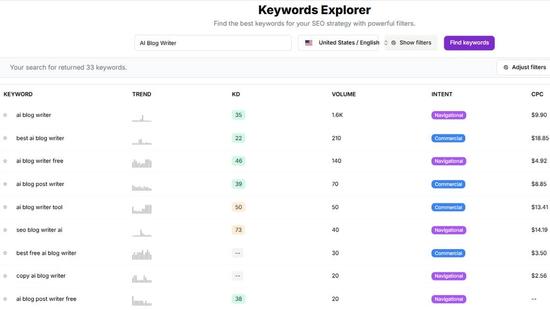
Both are one-time purchases, and one credit is one keyword lookup. SEO Stuff's Keywords Explorer takes a keyword, domain or URL and returns search volume, keyword difficulty, search intent and AI Overview data, with filters for difficulty, volume, CPC and intent. Bulk keyword search checks up to 1,000 keywords at once and exports them to CSV. There is also a backlinks explorer for the links pointing to any domain.
SEO Stuff doesn't have a rank tracker, a site audit crawler or a content editor. It covers the research part of an SEO suite and charges you only when you research.
$129 a Month and Up: Full SEO Suites
- Ahrefs Lite: $129 a month with 1,000 credits per user, 2,500 rows per report and 6 months of history. Standard is $249. Paying annually saves up to 17%. Ahrefs doesn't list a free trial (it points website owners to Ahrefs Free), and it says it does not issue refunds in general.
- SE Ranking Core: $129 a month, or $103.20 a month billed annually, with 2,000 keywords tracked daily and a 14-day free trial that needs no credit card.
- Semrush SEO: $139 a month, or $117.33 a month billed annually, covering 5 websites and 500 keywords tracked daily, with a seven-day free trial.
These are not cheap tools, but they can be the cheapest way to do a lot of research, as the math below shows. For plan-by-plan detail, see our breakdowns of Ahrefs pricing and its limits and cheaper Semrush alternatives.
Before you commit to a suite, get a free SEO and AI search audit to see whether your site needs more keyword data or something else entirely.
Subscription vs Pay-Per-Use: Which Saves You Money?
A subscription charges a fixed amount every month for a set of tools and limits. Pay-per-use charges for each lookup and nothing in the months you don't research. Subscriptions also carry costs that aren't in the headline price:
- Extra users: Ahrefs charges up to $40 a month per extra user on Lite (billed by usage) and $60 on Standard, and Semrush seats start at $45 a month.
- Overages: if you turn on Ahrefs' pay-as-you-go option, it charges you automatically once you go past your plan's limits.
- Annual prepayment: the bigger discounts (up to 17% on Ahrefs, 20% on SE Ranking) mean paying for the whole year upfront.
A plan you forget to cancel keeps billing too. Credits have their own catches. Some expire after a year (Keywords Everywhere credits and LowFruits pay-as-you-go credits both do), so read the terms before you buy a large pack, and remember one big list can drain a small pack in a single run.
Here is the math with the prices above. These are worked examples, not customer data, and SEO Stuff figures use the Startup pack at 3.3 cents per keyword.
Example 1: About 1,000 Keywords a Year (Occasional Research)
- Free stack: $0, with capped difficulty data and little competitor data.
- Keywords Everywhere Bronze: $84 for the year, covering volume, CPC, competition and trend.
- SEO Stuff: one Startup pack for $99, with 2,000 credits left over.
- One or two months of Semrush SEO: $139 to $278.
- Ahrefs Starter or Ubersuggest Start kept all year: $348.
At this volume, a year-round subscription is the most expensive way to work.
Example 2: 1,000 Keywords Every Month
- SEO Stuff: 12,000 lookups a year is four Startup packs, or $396.
- SE Ranking Core: $1,548 a year on monthly billing, or $1,238.40 billed annually.
- Ahrefs Lite: $1,548 a year on monthly billing.
- Semrush SEO: $1,668 a year on monthly billing, or $1,407.96 billed annually.
Credits cost about $840 to $1,270 less per year here. That gap counts keyword lookups only. The suites also include rank tracking and audits, so if you would pay for those somewhere else, add that cost to the credits side.
Example 3: 5,000 Keywords Every Month
- SEO Stuff: 60,000 lookups a year is 20 Startup packs, or $1,980.
- SE Ranking Core billed annually: $1,238.40.
- Semrush SEO billed annually: $1,407.96.
Here the subscription wins on price and includes more. Keywords Everywhere Bronze would still cover 60,000 lookups for $84 if volume and CPC are all you need.
The Break-Even Point
At 3.3 cents a keyword, $129 buys about 3,900 lookups and Semrush's annual rate of $117.33 buys about 3,550. If you check more than roughly 3,500 to 4,000 keywords every month, all year, a subscription usually costs less. Below that, credits or free tools cost less, as long as you don't need tracking and audits.
Not sure how many keywords your site actually needs to check? Request a free SEO audit to see where your biggest gaps are before you buy anything.
How to Do Keyword Research on a Reasonable Budget
The easiest money to save in keyword research is the money spent checking keywords you were never going to use. This order keeps the paid part small:
- Start with what you already rank for. In Search Console, look for queries where your average position is roughly 8 to 30. Google already connects those pages to the topic, so they are usually the fastest wins. These advanced keyword search techniques show how to mine them.
- Generate ideas for free. Use Keyword Planner's "Discover new keywords," autocomplete, People Also Ask and a free keyword generator to build a long list.
- Clean the list before you pay. Remove duplicates, irrelevant terms and competitor brand names. On a per-keyword tool, every duplicate costs a credit.
- Pay only for the shortlist. Run the cleaned list through one bulk lookup to get difficulty and intent. Our guide to checking 1,000 keywords in 30 minutes walks through the filtering step by step.
- Rent a suite for the jobs that need one. For a competitor gap analysis or a full backlink review, pay for one month, do the work and cancel before it renews. Check refund terms first. Ahrefs, for example, says it does not issue refunds in general.
- Track your cost per keyword. Divide what you spent by the keywords you actually checked. If the number is high because a subscription sits idle, switch to credits. If you buy a new pack every few weeks, a subscription is probably cheaper.
How to Choose a Keyword Research Tool Based on Budget and Features
Start with three questions. How many keywords do you check in a typical month? Do you need difficulty and intent, or just volume? And do you need rank tracking, audits or extra seats? Then match your answers:
- $0 budget, one site: Search Console plus Keyword Planner, with free tiers for spot checks. Search Console also covers your own average positions, so you may not need a rank tracker yet.
- Volume on big lists, under $100 a year: Keywords Everywhere Bronze.
- Research in bursts, with difficulty and intent: one-time credit packs, as long as you stay under roughly 3,500 keywords a month.
- One site, light steady use, a bit of everything: Ahrefs Starter or Ubersuggest at $29 a month.
- Weekly research, tracking and audits, client work or more than 4,000 keywords a month: Ahrefs, Semrush or SE Ranking.
Whichever tool fits your budget, get your free SEO and AI search audit first so you know what to research before you spend a dollar.
Frequently Asked Questions
What is the cheapest or most affordable keyword research tool?
Google Search Console and Google Keyword Planner are free. Among paid tools, Keywords Everywhere is the cheapest per keyword at $84 a year for 100,000 credits, or $0.84 per 1,000 keywords for volume, CPC, competition and trend data.
What are the pros and cons of using free vs. paid keyword research tools?
Free tools cost nothing, and Search Console shows real data for your own site, but they give you little competitor data, capped or missing difficulty scores and few bulk options. Paid tools put all of that in one place, but subscriptions bill monthly whether you use them or not, and their numbers are still estimates.
Is Google Keyword Planner free?
Yes. Google calls it a free resource, but you need a Google Ads account with setup completed, including billing information, and a campaign before you can use it. Its volumes are rounded, and it has no organic difficulty score.
Can I use Ubersuggest for free?
Ubersuggest has limited free features, and its paid monthly plans come with a one-time 7-day free trial. The cheapest paid plan, Start, is $29 a month for 150 reports a day and one project.
Is pay-per-use cheaper than a subscription for keyword research?
For occasional research, yes. At SEO Stuff's Startup rate of 3.3 cents per keyword, credits cost less than an entry-level suite plan until you check roughly 3,500 to 4,000 keywords every month. Above that, a subscription is cheaper and includes tracking and audits.
Final Thoughts
Start free. Search Console and Keyword Planner answer more questions than most small sites ask. Add a paid tool when a specific gap shows up: Keywords Everywhere for volume on big lists, credits for difficulty and intent a few times a year, and a suite once you research every week or need tracking and audits. Check your cost per keyword every few months and switch models when the numbers stop working.
Want this done for you?
SEO Stuff gets businesses cited by ChatGPT, Gemini, Perplexity and Claude, and ranking in Google. Start with the free audit, a call, or the package.
See where you stand
A free, manual SEO + AI search audit of your site, with a report within 48 hours. No credit card, no sales call.
Get the free auditTalk it through
A free 20-minute call with the founder about whether AI search is a meaningful opportunity for your business.
Book a callHave it done
The Done-For-You Package: audit, 10 pages of content, 3 DR50+ placements, dashboard. $999 once, delivered in 21 business days.
See the package